
2-Explorer
August 9, 2012
Solved

Desktop integration 10.1 M010 errors

  • August 9, 2012
  • 5 replies
  • 6754 views

All users at my company that are using WC10.1 desktop integration keep getting this error even though office integration and file download mechanism is set correctly at the org level.

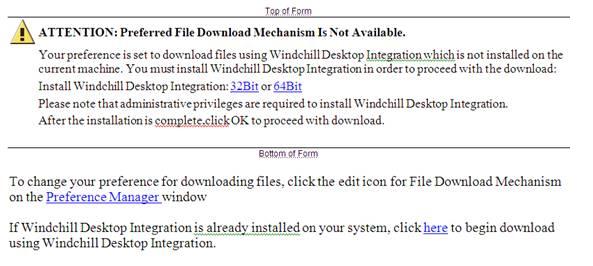
ATTENTION: Preferred File Download Mechanism Is Not Available.

One user has an additional issue - all the downloaded files are data.wcdti.txt instead of the office (word, excel, power point) file. The text file has all the meta data. For everyone else the download filel is the correct office document....

I dont understand why the desktop integration has so many error......

Has anyone else encountered the same errors.

Gord
Best answer by gmehta

Hello – These are the solutions that worked for my company.

Solution #1 – (from PTC)

For this you have to apply a property in wt.properties file. Run using Windchill Shell

xconfmanager –s wt.doc.ignoreDTIInstallationCheckForAllBrowsers=true –t <Windchill_Home>\codebase\wt.properties –p

where <Windchill_Home> is the location of Windchill installation directory.

DTI error.JPG

Solution #2 – (PTC and my idea combined)

I found the file WTTaskRun.exe in C:\Program Files\PTC\Desktop Integration and set up windows to open the data file using this program always.

When the .wcdti file is opened using WTTaskRun.exe the correct document opens. As I have setup windows to always use WTTaskRun.exe for the data file the issue has been resolved.

thanks

Gord

5 replies

1-Visitor
August 13, 2012

Can you tell me more about this issue? Which browser and version, which OS and version and which version of MS Office? Have you discussed this issue with PTC technical support? Do you have a call #?

gmehta2-ExplorerAuthor
2-Explorer
August 14, 2012

Hello,

The error for:

ATTENTION: Preferred File Download Mechanism Is Not Available....

This is company wide issue so MS office (2007 & 2010), Windows 7 and XP (both 32 and 64 bit), Internet explorer 8, 9 and Google Chrome Versoin 21

One user has an additional issue - all the downloaded files are data.wcdti instead of the office document - This user is Windows 7 (32 bit) using Office 2010 (32 bit). Internet Explorer 9 & Google Chrome Versoin 21

PTC support has not been able to resolve this issue yet...Call # 10940725

Gord

* Desktop integration verison 10.1 M010 has been installed for all the users that are being disucssed in this topic****

1-Visitor
August 14, 2012

PTC implemented a new property to skip the DTI download verification check due to complications with Internent Explorer on 64bit OS and Chrome. There are no issues with FireFox, but I understand this is not always an option. The easy work-around is to choose the download now link in the pop-up window, but most users do not see this link right away.

The SPR is 2103340 and was submitted to WC 10.1 M030. You should be able to request a patch for M010 if you cannot upgrade at this time.

This is a temporary fix until the new Windchill DTI installer is completein a maintenance release of Windchill 10.2.

I don't have a quick fix for the download issue, so please continue to work with TS on that issue.