

10-Marble
July 6, 2016
Solved

Display the CN a CA task initializes from in Home Page > Tasks

  • July 6, 2016
  • 3 replies
  • 5597 views

Greetings,

My users have a legitimate complaint in this one.  They are wanting to know, at a glance, from their Tasks list which Change Notice the Change Activity task generated from the Implementation plan was created in.

By default there is a Name (task name for the workflow node) and Subject (a concatenation of Type-Number and task name as defined in the implementation plan), however, there is no reference to which CN the Task was created from.

I am looking for any creative way to help the users determine from which CN there CA tasks are coming from across their assigned list.

Thanks in advance.

Cam
Best answer by JeffZemsky

Cameron,

Unfortunately alias attributes are not always straight forward.  In this case you need to start with the Change Task and then navigate to the Change Notice and get its info - the Alias attribute is:

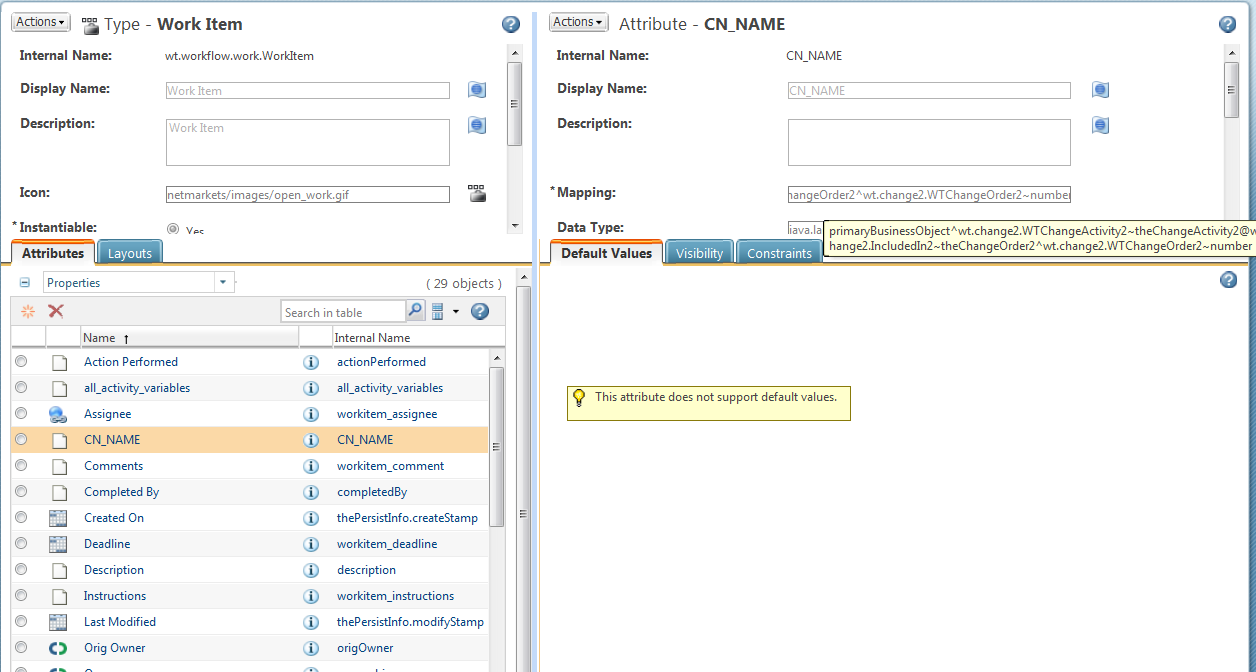
primaryBusinessObject^wt.change2.WTChangeActivity2~theChangeActivity2@wt.change2.IncludedIn2~theChangeOrder2^wt.change2.WTChangeOrder2~number

The Work Item entry looks like the following - not I am mousing over the field to highlight its entry

wi_entry.png

And results in:

cn_name example.png

3 replies

1-Visitor
July 7, 2016

I addressed a similar issue with alias attributes between the Notice and the Task and Workflow/Task variables to get the value to show up in the User's Task Table

cswaner10-MarbleAuthor
10-Marble
July 7, 2016

Thank you for the response.

Can you please share more detail on how to set this up?

1-Visitor
July 7, 2016

Another solution is to get the parent CN number in the CA workflow and then change name of the task.

you can append the CN number after the task name.

E.G.: Review Task - ECN12345

The task name will also show up in the email subject.

cswaner10-MarbleAuthor
10-Marble
July 7, 2016

Can you please share the workflow details (methods, expressions, etc.) you used to accomplish this?

17-Peridot
July 7, 2016

In 10.1 M040 and newer one can add Alias attributes to the workitem that can be displayed in the Task table.  For example one can show the CN related to the CT in the Task table.  See the following link for information:

http://support.ptc.com/cs/help/windchill_hc/wc102_hc/index.jspx?id=SiteAdminChp_BestPracticeDisplayAliasAttrOnMyTaskTable&action=show

Here is an example showing the CN as well as an attribute from the CN (you can navigate across relationships to get other attributes)

ct alias example.png

cswaner10-MarbleAuthor
10-Marble
July 7, 2016

Jeff,

Awesome response!  However, I am having trouble showing the CN Number or Name for the Work Item generated from the task on the Implementation plan (CA workflow).

I've tried:

primaryBusinessObject^wt.change2.VersionableChangeItem~name

primaryBusinessObject^wt.change2.WTChangeOrder2~number

Neither of which do exactly what I want.

Please advise.

17-Peridot
July 7, 2016

Cameron,

Unfortunately alias attributes are not always straight forward.  In this case you need to start with the Change Task and then navigate to the Change Notice and get its info - the Alias attribute is:

primaryBusinessObject^wt.change2.WTChangeActivity2~theChangeActivity2@wt.change2.IncludedIn2~theChangeOrder2^wt.change2.WTChangeOrder2~number

The Work Item entry looks like the following - not I am mousing over the field to highlight its entry

wi_entry.png

And results in:

cn_name example.png
