
21-Topaz I
August 13, 2015
Solved

Document File Name changing

  • August 13, 2015
  • 1 reply
  • 1222 views

We control many of our documents in PDMLink as a sub-type of "Document".  One of my users put in a PDF as this document sub-type.  Now they want to replace the PDF with a DOCX file.  But every time we try to check it in the File Name gets a "-1" added.

For example: The PDF file name is 123456.pdf and the docx file is 123456.docx.  But when we check it in it changes it to 123456-1.docx.

Has anyone seen this and/or know why it happens?

The Number field is the same for both the PDF and DOCX.
Best answer by BineshKumar1

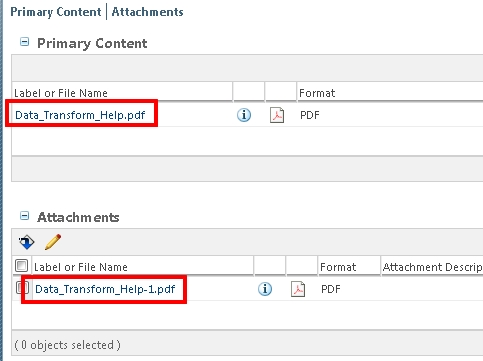
I have noticed this when there is a secondary attachment with the same name already exists for that document. See whether you have a secondary attachment 123456.docx  already exists with 123456.pdf similar to below.

attachment.jpg

Thanks

Binesh Kumar

Barry Wehmiller

1 reply

1-Visitor
August 14, 2015

I have noticed this when there is a secondary attachment with the same name already exists for that document. See whether you have a secondary attachment 123456.docx  already exists with 123456.pdf similar to below.

attachment.jpg

Thanks

Binesh Kumar

Barry Wehmiller

STEVEG21-Topaz IAuthor
21-Topaz I
August 14, 2015

Great call Binesh!  I was all ready to write back saying we don't use attachments to our documents but I better just check.  There it was.  And because I didn't think we use attachements I didn't even have that table on my tab on the detail page.

What this user did then was create the PDF from the DOCX.  He made the PDF the main file then put the source file (DOCX) as the attachment.

Thank you!