17-Peridot
June 3, 2024
Solved

Drop-down list for attribute units?

  • June 3, 2024
  • 1 reply
  • 884 views

Hi Guys,

I am looking for How can set default units or drop-down units in Attributes after the value entered[box].


Attribute Name: Suction Pressure1 and I also created one more attribute for Units like in the below image.

Amirtharaj_K_0-1717411494477.png

Question 1: How can we create attributes with units?

Question 2: If it's not possible Q1 means how to combine 2 attribute values in CAD side or WT Part info.


Method:1

When we create an attribute set with a type that is calculated and a real number with units, we will get a unit of measurement in the dropdown list.

Can I get the same drop-down list after adding the layout because I don't want the default unit?


Regards,

AJ

Best answer by Fadel

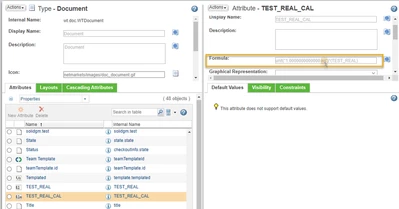
you can conver real number to real number with units using below 

unit("1.000000000000 <unit of measurement>")*(<formula>)

Fadel_0-1717661828583.png


1 reply

Fadel
Fadel23-Emerald IAnswer
23-Emerald I
June 6, 2024

you can conver real number to real number with units using below 

unit("1.000000000000 <unit of measurement>")*(<formula>)

Fadel_0-1717661828583.png


Buiꓘa
17-Peridot
June 7, 2024

Thanks @Fadel it's working 
Do you have a list formula like this that we can use in Windchill?


Regards,

Aj

Fadel
23-Emerald I
June 7, 2024

Hello Amir, Here the help center link 

Calculated Attribute Formulas (ptc.com)


Buiꓘa