
14-Alexandrite
October 14, 2025
Solved

Eclipse Configuration for Windchill 13

  • October 14, 2025
  • 1 reply
  • 355 views

Version: Windchill 13.0


Use Case: How to configure eclipse in a local machine where windchill is not installed? All the jars from WEB-INF/Lib and Codebase/LIB are copied but still the import commands throw error. Has something changed in windchill 13 with import of Jars?

Description:

How to configure eclipse in a local machine where windchill is not installed? All the jars from WEB-INF/Lib and Codebase/LIB are copied but still the import commands throw error. Has something changed in windchill 13 with import of Jars?

Best answer by HelesicPetr

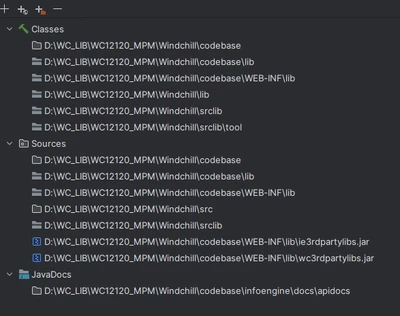
You have to configure your IDE to use je libraries in the project, 

Something like this >

HelesicPetr_0-1760446573221.png


PS> you have not mentioned any error you could see. 

PetrH

1 reply

HelesicPetr
22-Sapphire II
22-Sapphire II
October 14, 2025

Hi @AP_10483126 

Nothing has been changed in general. 

I keep using the machine without Windchill installation and IDE works without any trouble.

I use library for all windchill versions based on a project. 10.2, 11.0. 11.1, 12.0, 12.1 , 13,0 , 13,1 

as a last library I used windchill 13.1.2.0 


You should be more specific in your case where is your trouble. 


PetrH 

14-Alexandrite
October 14, 2025

I have imported the JARs from windchill 13 installation from the location of the codebase\WEB-INF\lib & codebase\lib. Still the import functions like 

import wt.change2.ChangeHelper2;
import wt.change2.ChangeService2;
import wt.change2.Changeable2;
import wt.change2.WTChangeActivity2;
import wt.change2.WTChangeOrder2;


are throwing errors and not recognizable.

HelesicPetr
22-Sapphire II
22-Sapphire II
October 14, 2025

You have to configure your IDE to use je libraries in the project, 

Something like this >

HelesicPetr_0-1760446573221.png


PS> you have not mentioned any error you could see. 

PetrH