
1-Visitor
August 17, 2015
Solved

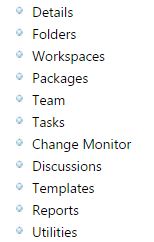
Edit product subtitles (Details,Folders,Workspaces,Team..)

  • August 17, 2015
  • 6 replies
  • 2104 views

Hello all,

I want to edit product subtitles (Details,Folders,Workspaces,Packages,Team,Tasks..)

For example, I want to change "Details" as "Detaylar".  How can I edit ?

Thanks in advance.
Ekran Alıntısı.JPG

Best answer by satre-2

Below the files you need to change 

For EPMDocument --> com\ptc\windchill\uwgm\util\uwgmutilResource\java

For WTDocument --> com\ptc\windchill\enterprise\doc\documentResource.java

Thanks

Shreyas

6 replies

1-Visitor
August 17, 2015

  Labels for this actions are rendereeyasd from \Windchill\src\com\ptc\core\ui\navigationRB.java  class

You can update the Java class to change the display.

details.png

I am not  sure about language which you are using.  You can also check the  if your language is available in Language Pack.

Hope it helps !!!

Thanks

Shreyas

cdurmaz1-VisitorAuthor
1-Visitor
August 17, 2015

Dear Shreyas,

I updated that folder then I restarted the Windchill but there is no any change.

1-Visitor
August 17, 2015

After updating those files you need to compile java class and restart windchill services. You can run below command to compile java class.

ant -f bin/tools.xml class -Dclass.includes=com\ptc\core\ui\navigationRB.java

folder.jpg

Thanks

shreyas