9-Granite
October 25, 2024
Solved

Editable field in WTpart structure attributes

  • October 25, 2024
  • 1 reply
  • 1335 views

Version: Windchill 13.0


Use Case: List of soft type editable


Description:

Hello, some one knows how to create 1 or more attributes editable to insert in structure wtpart or similar.

For example i would like to insert "weight"
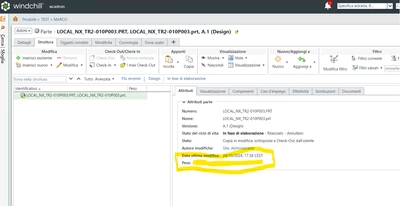
Immagine 2024-10-25 100040.png

in this page

Best answer by joe_morton

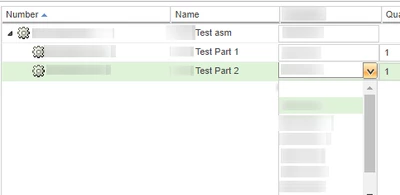
You can do inline editing when in a structure view. See: https://support.ptc.com/help/wnc/r11.2.1.0/en/index.html#page/Windchill_Help_Center/NewandChanged_11_2_10_PSBInlineEditing.html


Make sure that the preference is enabled: https://www.ptc.com/en/support/article/CS375084?source=search


Example: 


joe_morton_2-1730139684773.png


1 reply

16-Pearl
October 25, 2024

Try the steps in this article: What are the steps needed in order to update the "weight" on a wt.part with the value from the corresponding CAD document?


https://www.ptc.com/en/support/article/CS20049

9-Granite
October 25, 2024

No, should be free fillable directly from Windchill

16-Pearl
October 25, 2024

So you just want an additional attribute that is not mapped to anything? Have you tried:


Site level Type and Attribute management

1. Create a resuable attribute

2. Select the Part object type -> Create a new attribute (type of global), select the resuable attribute that was created.