
1-Visitor
April 30, 2015
Solved

Efficient way to add large numbers of affected objects to change requests?

  • April 30, 2015
  • 3 replies
  • 2134 views

I have an excel spreadsheet of a little over 2000 objects that need to be added to the affected objects table of a change request. Does anyone know of a way to do this that doesn't involve searching for and adding 2000 individual items? Is there some way to "mass add" part numbers, maybe by copy/pasting them from somewhere? Any help would be appreciated, thanks.

Best answer by BenPerry

Jordan‌‌,

Depending on your requirement, use * wildcard character or not (or perhaps ? wildcard character).

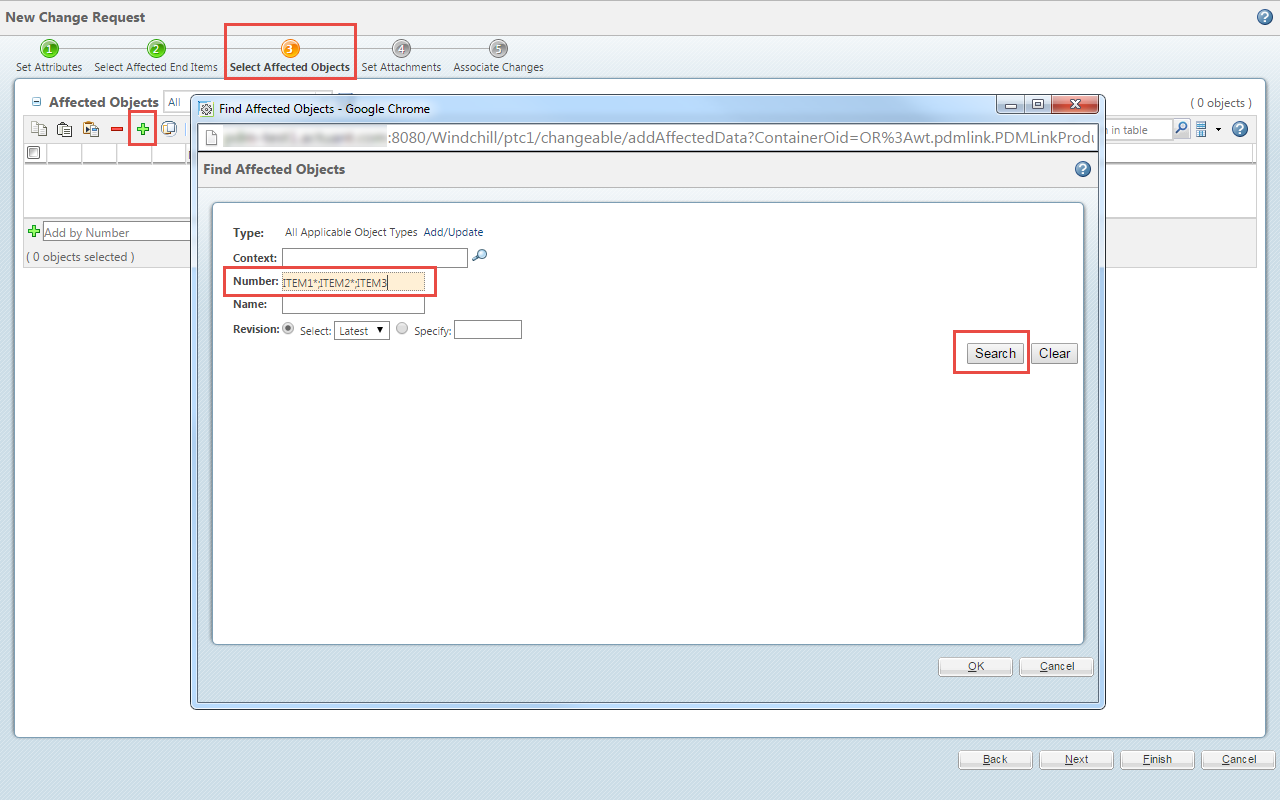
  1. Click on the green + button to open the "Find Affected Objects" screen.
  2. Enter a string in the Number field that includes the part numbers separated by a semi-colon (;).
    1. For example: ITEM1*;ITEM2*;ITEM3.
    2. FYI...I think the character limit for this type of thing is 1000 characters. So watch out or it will get truncated and you won't get all 2000 objects.

2015-04-30_14-32-34.png

3 replies

BenPerry
BenPerry15-MoonstoneAnswer
15-Moonstone
April 30, 2015

Jordan‌‌,

Depending on your requirement, use * wildcard character or not (or perhaps ? wildcard character).

  1. Click on the green + button to open the "Find Affected Objects" screen.
  2. Enter a string in the Number field that includes the part numbers separated by a semi-colon (;).
    1. For example: ITEM1*;ITEM2*;ITEM3.
    2. FYI...I think the character limit for this type of thing is 1000 characters. So watch out or it will get truncated and you won't get all 2000 objects.

2015-04-30_14-32-34.png

1-Visitor
April 30, 2015

Thanks, I tried that but the only thing my part numbers had in common was their length, which they also shared with a lot of objects that didn't need to be added. I ended up using the following procedure:

save excel list as text file (space delimited) -> copy groups of space-seperated part numbers into "Keyword" field of Advanced Search with "Find: with any of these criteria" set -> select objects from search results -> paste into Affected Objects.

Unfortunately, this limited me to adding about 100 objects at a time, thus getting through one list required doing this twenty times. So I am still looking for a more efficient way if anyone knows of one.

Thanks again for the suggestion.