16-Pearl
June 17, 2015
Solved

Email notification when needed

  • June 17, 2015
  • 1 reply
  • 1495 views

Our business unit director want to be emailed as part of a workflow but only when necessary.  Currently there is an email node that sends out an email to multiple users each time a document is created and run thru the workflow....is there a way to add a check box to the task page that when checked he would get an email, if not checked he would not get one?  Any other ideas on how to achieve this would be greatly appreciated. 

Best answer by BrianToussaint

Hello Greg,

We actually have this setup in our CN workflow.  There are certain groups that only need to see certain CNs so we control it via attributes in the CN.  However, our users can update these while in the task and they will be pushed back to the CN when the task is done.  Here is the code that we use to gather the variables (we also put some of them in the body of the email), and the code to route it.  Here is a snapshot from our process.
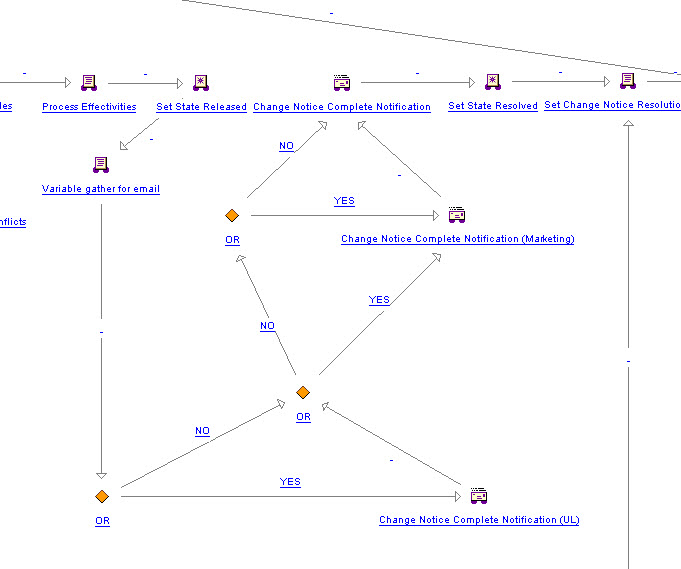
6-17-2015 1-36-13 PM.jpg

Here is the code for the Variable gather for email under the Expression tab:

com.ptc.core.lwc.server.LWCNormalizedObject obj = new com.ptc.core.lwc.server.LWCNormalizedObject (primaryBusinessObject,null,null,null);

obj.load("ULREQ","NMDD","TOOLINGREQ","AUXCODE","CNCODE","LITREQ","EFFECTIVEDATE1","MKTLITREQ");
Object cnULREQ=obj.get("ULREQ");
Object cnNMDD=obj.get("NMDD");
Object cnTOOL=obj.get("TOOLINGREQ");
Object cnAUX=obj.get("AUXCODE");
Object cnCNCODE=obj.get("CNCODE");
Object cnLITREQ=obj.get("LITREQ");
Object cnEFFDATE=obj.get("EFFECTIVEDATE1");
Object cnMKTLITREQ=obj.get("MKTLITREQ");

if (cnULREQ instanceof String){
CN_ULREQ = (String) cnULREQ;
}

if (cnMKTLITREQ instanceof String){
CN_MKTLITREQ = (String) cnMKTLITREQ;
}

if (cnNMDD instanceof String){
CN_NMDD = (String) cnNMDD;
}

if (cnTOOL instanceof String){
CN_TOOLINGREQ = (String) cnTOOL;
}

if (cnAUX instanceof String){
CN_AUXCODE = (String) cnAUX;
}

if (cnCNCODE instanceof String){
CN_CNCODE = (String) cnCNCODE;
}

if (cnLITREQ instanceof String){
CN_LITREQ = (String) cnLITREQ;
}

if (cnEFFDATE instanceof String){
CN_EFFECTIVEDATE = (String) cnEFFDATE;
}

Here is one of the OR routings:

if ("YES".equals(CN_ULREQ)){

result = "YES";

} else if ("yes".equals(CN_ULREQ)){

result = "YES";

} else {

result = "NO";

}

I forgot to add how to get the check box:

You need to add a Variable under Properties of the workflow that is Visible.

6-17-2015 1-52-07 PM.jpg

6-17-2015 1-52-47 PM.jpg

1 reply

19-Tanzanite
June 17, 2015

Hello Greg,

We actually have this setup in our CN workflow.  There are certain groups that only need to see certain CNs so we control it via attributes in the CN.  However, our users can update these while in the task and they will be pushed back to the CN when the task is done.  Here is the code that we use to gather the variables (we also put some of them in the body of the email), and the code to route it.  Here is a snapshot from our process.

6-17-2015 1-36-13 PM.jpg

Here is the code for the Variable gather for email under the Expression tab:

com.ptc.core.lwc.server.LWCNormalizedObject obj = new com.ptc.core.lwc.server.LWCNormalizedObject (primaryBusinessObject,null,null,null);

obj.load("ULREQ","NMDD","TOOLINGREQ","AUXCODE","CNCODE","LITREQ","EFFECTIVEDATE1","MKTLITREQ");
Object cnULREQ=obj.get("ULREQ");
Object cnNMDD=obj.get("NMDD");
Object cnTOOL=obj.get("TOOLINGREQ");
Object cnAUX=obj.get("AUXCODE");
Object cnCNCODE=obj.get("CNCODE");
Object cnLITREQ=obj.get("LITREQ");
Object cnEFFDATE=obj.get("EFFECTIVEDATE1");
Object cnMKTLITREQ=obj.get("MKTLITREQ");

if (cnULREQ instanceof String){
CN_ULREQ = (String) cnULREQ;
}

if (cnMKTLITREQ instanceof String){
CN_MKTLITREQ = (String) cnMKTLITREQ;
}

if (cnNMDD instanceof String){
CN_NMDD = (String) cnNMDD;
}

if (cnTOOL instanceof String){
CN_TOOLINGREQ = (String) cnTOOL;
}

if (cnAUX instanceof String){
CN_AUXCODE = (String) cnAUX;
}

if (cnCNCODE instanceof String){
CN_CNCODE = (String) cnCNCODE;
}

if (cnLITREQ instanceof String){
CN_LITREQ = (String) cnLITREQ;
}

if (cnEFFDATE instanceof String){
CN_EFFECTIVEDATE = (String) cnEFFDATE;
}

Here is one of the OR routings:

if ("YES".equals(CN_ULREQ)){

result = "YES";

} else if ("yes".equals(CN_ULREQ)){

result = "YES";

} else {

result = "NO";

}

I forgot to add how to get the check box:

You need to add a Variable under Properties of the workflow that is Visible.
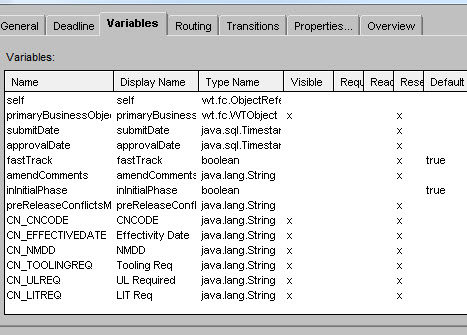
6-17-2015 1-52-07 PM.jpg

6-17-2015 1-52-47 PM.jpg

GregOlson16-PearlAuthor
16-Pearl
June 17, 2015

That's exactly what I was thinking...I setup a variable (boolean) on the task so there is a checkbox for the user to select...or not.  Now I need to figure out a true false code to enter into the conditional note to route it correctly.  Do you have any examples that I could easily modify to achieve this....not really a code guy and to get something out of PTC is like pulling teeth.

Thanks,

Greg
