
14-Alexandrite
December 15, 2022
Solved

Empty attributes appear on the screen

  • December 15, 2022
  • 2 replies
  • 1606 views

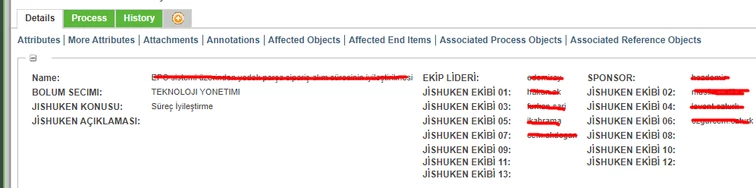
hello, if I remember correctly, when I put an attribute in the more attribute layout, it was not showing on the screen if no data was entered into it.

However, at the moment, the attributes that I added to more attributes and did not enter data into appear on the screen, creating a bad image.


How do I prevent the attributes that I do not enter data into appear on the screen?
onur_0-1671111061347.png


Best answer by SWeiler_9940261

In the layout, go to the layout you want to edit, click on the 'eye' icon and choose the option to hide attributes without values. See screen shot. 

2 replies

16-Pearl
December 15, 2022

In the layout, go to the layout you want to edit, click on the 'eye' icon and choose the option to hide attributes without values. See screen shot. 

14-Alexandrite
December 16, 2022

Wonderful. thank you very much. That's why I love community so much.