

4-Participant
April 24, 2025
Question

Entering FMEA Data - "Processing section"

  • April 24, 2025
  • 1 reply
  • 376 views

Version: Windchill 11.0


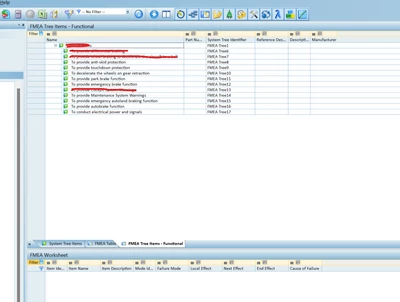
Use Case: Hi I'm following the instructions of the link below to entering FMEA Data for a functional FMEA. https://support.ptc.com/help/wrr/r12.0.1.0/en/index.html#page/wrr/GettingStartedGuide/FMEA/FMEAData.html In the 2nd step it says "In the FMEA Tree Items - Functional table, select Processing Section." I cannot find where to select "Processing Section" Could someone please guide me?


Description:

Entering FMEA Data: Entering FMEA Data

Where to find "Processing Section"?

JR_13333870_0-1745479416965.png


Here below, the FMEA Tree items - Functional is selected but cannot see where to select the "Processing Section"
JR_13333870_1-1745479533517.png


1 reply

Catalina
Community Moderator
April 29, 2025

Hi @JuanR_61021 

Thank you for your question. 

Your post appears well documented but has not yet received any response. I am replying to raise awareness. Hopefully, another community member will be able to help.

Also, feel free to add any additional information you think might be relevant. For example:

  • Have you followed the steps to navigate to the FMEA Tree Items - Functional table as described in the documentation?
  • Do you have the necessary permissions to access and modify the FMEA data in Windchill?
  • Is there any customization in your Windchill interface that might be hiding or altering the display of the "Processing Section"?

Best regards,

Catalina | PTC Community Moderator