8-Gravel
August 7, 2025
Solved

Errors occurring due to full license usage

  • August 7, 2025
  • 3 replies
  • 1037 views

Currently, some of my clients are experiencing issues with Windchill, such as the global search bar not appearing or contexts and libraries not appearing when accessing Windchill after granting all licenses.


Even after clearing the cache and reconnecting, the issue sometimes persists, and sometimes it reappears.


If the issue persists after clearing the cache and reconnecting, clearing one license will restore normal functionality.


Is anyone else experiencing this issue?

Best answer by HelesicPetr

Hi @HK_10285495 

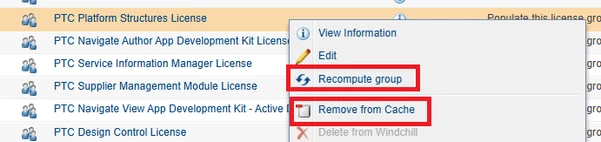
Usually if you assign the profile it is really good practice to remove user from a cache and also recompute all groups that profile access and acl access are refreshed by the latest configuration.

It is common behavior that sometimes it is necessary to do so. 


HelesicPetr_0-1754974911775.png


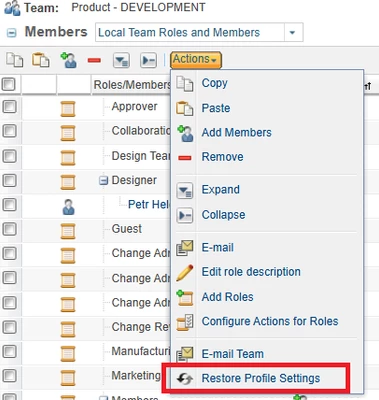
sometimes you have to restore Profile settings on a context from a team management

HelesicPetr_2-1754975010932.png


Be sure that the license does not have a profile that is disabled or any group 

PetrH

3 replies

Fadel
23-Emerald I
August 8, 2025

Can you share more info on, the statement "clearing one license will restore normal functionality." ?

When this happens does purge participant cache helps ?

Fadel_0-1754644084296.png


Buiꓘa
8-Gravel
August 10, 2025

well.... when this situation happened, i can't see the participant management. so i can't do this. 

well.. 'clearing one license will restore normal functionality.' that means literally If i leave one license(Windchill advanced or base), there is no problem.


[site's utility]

HK_10285495_0-1754865176260.png


avillanueva
23-Emerald I
23-Emerald I
August 8, 2025

Are you saying that some of your license pools are 100% allocated? By cache are you referring to the local browser cache or as @Fadel mentioned, participant cache?

8-Gravel
August 10, 2025

yes, i allocated all licenses 100%. 

Cache Means Local Cache. 

i can't remove participant's caches because when this happened, my windchill can't show the menu like participant management, license management.


HK_10285495_1-1754865698809.png


HelesicPetr
22-Sapphire II
22-Sapphire II
August 11, 2025

Hi @HK_10285495 

This is well know issue with old licenses and some PTC license profiles combination


For example you assign a license that is not used anymore and a profile is disabled. That can case your issue

check following article 


CS329469 - Missing links in "Site" > "Utilities" for "Administrators" after importing license files or upgrading Windchill

or

CS322772 - Administrator cannot access ‘License Management’ page after upgrading in Windchill PDMLink

or 

CS324730 - Links missing in Site Utilities for Administrator users to Windchill PDMLink


PetrH

joe_morton
18-Opal
18-Opal
August 11, 2025

On a related note, if you assign a "View and Print" license, in some versions of Windchill, the associated license profile will DISABLE some functionality. So you don't want to add a View and Print to anyone with a higher license assigned. 

8-Gravel
August 11, 2025

well we don't use "View and Print" License.


we use just Base, Advanced, CAD Licenses.


So, I think it's not the cause.