Hi @slapha
The context import/export is good for some small projects and similar systems also there could be compatibility problem with the target system.
Also there is time consuming preparation. You can use it easily for several objects. Nearly always you would need to redefine exported zip and prepare this import pack for target system. Especially the XML files that contain database information.
I did it several times and I always ended with solving issues step by step, one by one.
Problem with revision identification, lifecycle identification, dtd compatibility between version. ufid identification of any object.
ufid has to be unique, but if the system already has some data, it is impossible to import. You have to change it in the source files.
There are really many issues there that can pop up 😄 and you would not expect it.
Sometimes it is not logical why the error is shown.
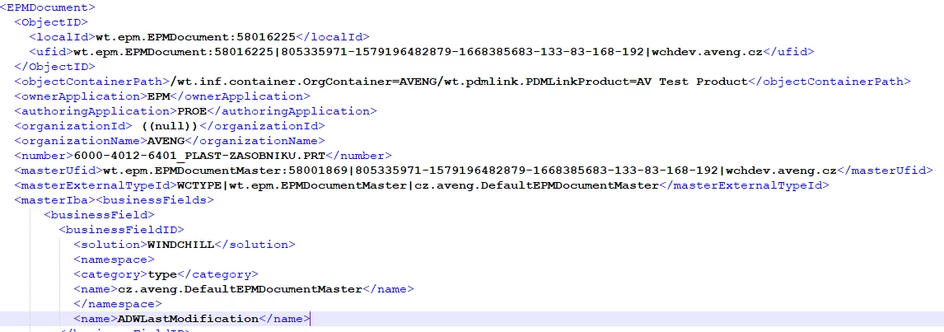
Here is an example snap of the import xml file from the exported zip
You could see that the domain information is there so it has to be also solved.
If you migrate to the new system, there are not so many issues with UFID and it is easier. Also I recommend to use same domain
This is my experience that I would say yes it is possible to use it, but first you have to identify all issues that should be solved on a small package of objects.
Then you can use it. but keep in mind, you can no export all in one click. If you have filevaults 1000 GB huge, then you have to split the export to a smaller packs. My experience is that more then 20GB can case some zippacking/downloading issues.
I believe that there are better ways how to migrate data. For example Windchill packages are better then context export/import where you can set the target system.. Sure you have to know how to configure it.
.
PetrH