
15-Moonstone
December 7, 2016
Solved

External designers access via ProjectLink, how would you set it up?

  • December 7, 2016
  • 7 replies
  • 4074 views

You could tell from the topic that I’m fairly new to ProjectLink…


I’ve read the old doc (we’re on 10.2 M030) “Integral Operations Between Windchill PDMLink and Windchill ProjectLink”, ploughed through topics on this forum, tested ACL, but it all don’t quite come together.


The scenario is not new. There’s a requirement that external designers (contractors) access CAD-data and Parts via ProjectLink. To make it more simple for own users we’re going to have only one product context in PDMLink. Some of the externals should be limited with what they see in PDMLink, others probably could see all. If possible, externals could be allowed to work on Released / Approved content ie. revise, but since Modify rights are required in PDMLink to be able to work on items shared to ProjectLink this does not seem like an option.


How do you set it all up? How to limit what they see in PDMLink?
 

Best answer by mdebower

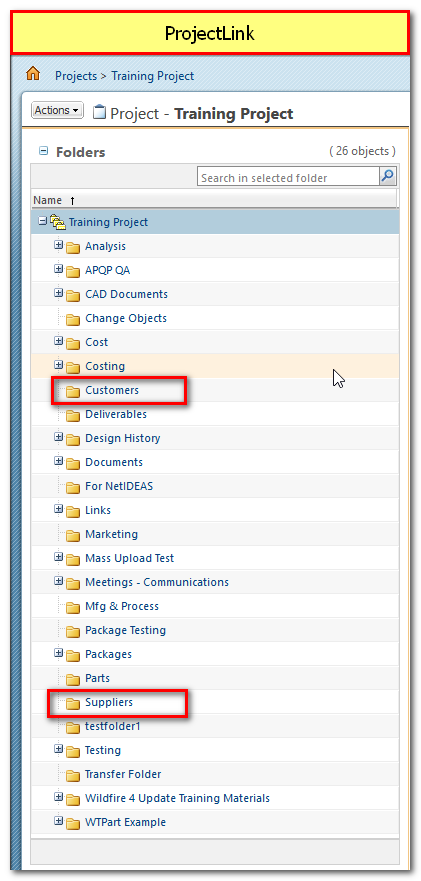
Actually, all the work is done in the Project on the ProjectLink side of Windchill.  (See screenshot.)

  • Create folders in a project.  Not in PDMLink, but ProjectLink.
  • Change folders security as described.
  • Change All and Team participants as Sergey describes.
  • Share from anywhere in PDMLink to the ProjectLink folders.
  • Check out from PDM anything that you want them to work on.
  • Check back into PDM (Send to PDM) when they are finished.

This way the external team members can only see what has been shared to the folder they have access.

For Supplier A and Supplier B access being different, you would have to have separate roles and folders.   Or separate Projects.   Having separate projects might be easier to administer, because once you had the roles and folder and security set up and working, you could use that as a template for the additional projects and just put different people in those roles.

-marc

20161208-103650.png

7 replies

1-Visitor
December 7, 2016

You can use the role based domain policy in your product context.

18-Opal
December 7, 2016

The way we have handled this situation is to have a role(s) on the team for the external team members.  In our case, there are two, Customer and Supplier. We give them limited access to one folder each, a Customer folder and a Supplier folder.

Process:

  1. Add Roles to Team, if needed.
  2. Send project invitations to external team members, adding them to the corresponding role.
  3. Manage Security on Main folder, Part 1.
    1. Give the external roles no access to the main folder and propagate to all.
    2. Click OK.
  4. Manage Security on Main folder, Part 2.
    1. Give the external roles Read Only access to just the main folder. (do not propagate.)
    2. Click OK
    3. Note, if you don't do this, they wont have read access to see the sub folder you want them to work in.
  5. Create or select a folder for the external role.
    1. Change to folder.
    2. Manage security on external role folder, giving them the permissions that they need.  I would suggest
      1. Read
      2. Download
      3. Modify
      4. Modify Content

-marc

CAD / PLM Systems Manager

TriMark Corporation, New Hampton, Iowa

20161207-093225.png

1-Visitor
December 7, 2016

By default all context roles assigned to the group "Team members" and have all permissions.

You must delete permissions for the "Team members" and make the separated permissions for the customers and for the suppliers by policy administration utility.

The suppliers can have permissions only for specific state of your lifecycle.

For example:

2.png