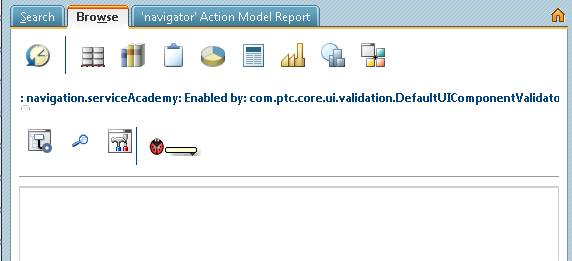
First Level and Second Level Navigator Tabs are not being displayed
Hi All,
I had tried adding a first level and second level navigator tabs. But that is not showing up in Windchill. Can anyone please let me know like why it is not displaying in that way ?
Please find the below steps that I had created while adding the tabs.
1.) Within codebase/netmarkets/jsp I had created a folder and a jsp file called as navigationlist.jsp which has the following code below
<%@ page language="java" session="true" pageEncoding="utf-8"%>
<%@include file="/netmarkets/jsp/util/begin.jspf" %>
Hello World!!!
<%@include file="/netmarkets/jsp/util/end.jspf" %>
2.) After that I copied an image to codebase/netmarkets/images
3.) And then in Eclipse I had created a JAVA file named as "NavigationRB.java"
import wt.util.resource.RBEntry;
import wt.util.resource.RBUUID;
import wt.util.resource.WTListResourceBundle;
@RBUUID("com.ptc.serviceAcademy.resource.NavigationRB")
public final class NavigationRB extends WTListResourceBundle {
@RBEntry("Services Academy")
public static final String NAVIGATION_SERVICEACADEMY_DESCRIPTION = "navigation.serviceAcademy.description";
@RBEntry("Services Academy")
public static final String NAVIGATION_SERVICEACADEMY_TITLE = "navigation.serviceAcademy.title";
@RBEntry("Services Academy")
public static final String NAVIGATION_SERVICEACADEMY_TOOLTIP = "navigation.serviceAcademy.tooltip";
@RBEntry("serviceAcademy.gif")
public static final String NAVIGATION_SERVICEACADEMY_ICON = "navigation.serviceAcademy.icon";
@RBEntry("Hello World")
public static final String OBJECT_HELLOWORLD_DESCRIPTION = "object.helloWorld.description";
@RBEntry("Hello World")
public static final String OBJECT_HELLOWORLD_TITLE = "object.helloWorld.title";
@RBEntry("Hello World")
public static final String OBJECT_HELLOWORLD_TOOLTIP = "object.helloWorld.tooltip";
@RBEntry("My Product List")
public static final String OBJECT_MYPRODUCTLISTTABLE_DESCRIPTION = "object.myProductListTable.description";
@RBEntry("My Product List")
public static final String OBJECT_MYPRODUCTLISTTABLE_TITLE = "object.myProductListTable.title";
@RBEntry("My Product List")
public static final String OBJECT_MYPRODUCTLISTTABLE_TOOLTIP = "object.myProductListTable.tooltip";
@RBEntry("Table Example")
public static final String OBJECT_TABLEEXAMPLE_DESCRIPTION = "object.tableExample.description";
@RBEntry("Table Example")
public static final String OBJECT_TABLEEXAMPLE_TITLE = "object.tableExample.title";
@RBEntry("Table Example")
public static final String OBJECT_TABLEEXAMPLE_TOOLTIP = "object.tableExample.tooltip";
@RBEntry("Multi Component Example")
public static final String OBJECT_MULTICOMPONENT_DESCRIPTION = "object.multiComponent.description";
@RBEntry("Multi Component Example")
public static final String OBJECT_MULTICOMPONENT_TITLE = "object.multiComponent.title";
@RBEntry("Multi Component Example")
public static final String MULTICOMPONENT_TOOLTIP = "object.multiComponent.tooltip";
}
4.) And then I had created an action in codebase\config\actions\custom-actions.xml as
<?xml version="1.0" encoding="UTF-8"?>
<!DOCTYPE listofactions SYSTEM "actions.dtd">
<listofactions>
<objecttype name="navigation" class="" resourceBundle="com.ptc.serviceAcademy.resource.NavigationRB">
<action name="serviceAcademy">
</action>
</objecttype>
<objecttype name="object" class="java.lang.object" resourceBundle="com.ptc.serviceAcademy.resource.NavigationRB">
<action name="helloWorld">
<command url="netmarkets/jsp/serviceAcademy/navigationlist.jsp" windowType="page"/>
</action>
</objecttype>
</listofactions>
5.) And then I updated the action model codebase\config\actions\custom-actionModels.xml
<?xml version="1.0" encoding="UTF-8"?>
<!DOCTYPE actionmodels SYSTEM "actionmodels.dtd">
<actionmodels>
<model name="main navigation" id="browseActions" resourceBundle="com.ptc.core.ui.navigationRB">
<description>
Main navigation (tabs)
</description>
<action name="recentContexts" type="navigation"/>
<action name="product" type="navigation"/>
<action name="library" type="navigation"/>
<action name="project" type="navigation"/>
<action name="program" type="navigation"/>
<action name="change" type="navigation"/>
<action name="supplier" type="navigation"/>
<action name="qms" type="navigation"/>
<action name="org" type="navigation"/>
<action name="site" type="navigation"/>
<action name="search" type="navigation"/>
<!-- entry for customization tab -->
<action name="customization" type="navigation"/>
<!-- entry for serviceAcademy tab -->
<action name="serviceAcademy" type="navigation"/>
</model>
<model name="serviceAcademy navigation" resourceBundle="com.ptc.serviceAcademy.resource.NavigationRB">
<action name="helloWorld" type="object"/>
</model>
</actionmodels>
6.) Restarted the method server.
So I followed all these steps as said. Can you please let me know if I had missed any other step or if I had done any other mistake as I am not able to view the the tabs.
Thanks and Regards,
Aditya Achanta