

1-Visitor
December 3, 2020
Solved

First Time Windchill Installation

  • December 3, 2020
  • 2 replies
  • 10247 views

Hi This is my first time trying to install Windchill, so I am sure I my issue is a simple mistake, but I have been struggling to find out the cause and need some insight or resources that can point me in the right direction.


I am trying to install Windchill 12.0.0.


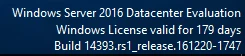
I am trying to do the install on a VM with a Windows server 2016 datacenter Evaluation (I am using a trial license, I don’t know if this matters).


VirtualBoxVM_nkfUK6LUiG.png


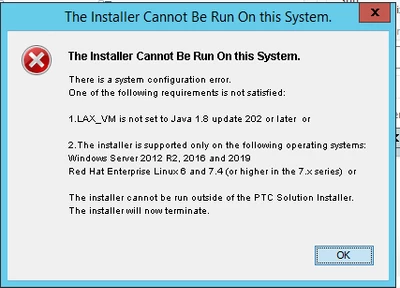
I have Java 15 installed and run the setup file with the following command in powershell:

avis_1-1607023046284.png


When I do this I receive the following error.

Attached are the log files associated with this error
avis_2-1607023046286.png


I also have java 1.8 update 202 installed.

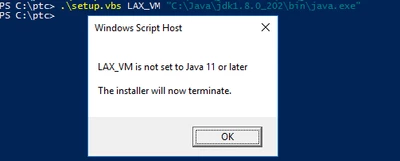
When I run the install with this version of java I receive the following
 

avis_3-1607023046288.png

I also get the above error when I use Jdk-11.0.7 which was recommended in the software matrix for windchill 12.0.0.0


I am sure it is a simple thing that I missed or didn’t do right.


Anyways, if you have any insight that would be awesome.

Best answer by MikeLockwood

Attached is a simple install procedure that you may find helpful.

2 replies

23-Emerald III
December 3, 2020

I just right click on the Setup.vbs file from File Explorer and select Run As Administrator.


avis1-VisitorAuthor
1-Visitor
December 3, 2020

For some reason the "Run as Administrator" option doesn't come up when I right-click it.

what I have been doing is running powershell as admin then running it from there. Is that the same thing?


22-Sapphire I
December 3, 2020

Windchill 12 requires both Java 1.8 and 1.11.

Both need to be selected from the PSI also.

avis1-VisitorAuthor
1-Visitor
December 3, 2020

So I have Java 1.8 update 202 installed,

how do I get the PSI to select both?

I get there error at the loading screen that appears after the language selection.


 VirtualBoxVM_bSPqPono0b.png


is there a way I can do it with powershell or cmd?


I feel like I'm over complicating this


22-Sapphire I
December 3, 2020

Attached is a simple install procedure that you may find helpful.