3-Newcomer
August 30, 2023
Solved

Folder permissions problem

  • August 30, 2023
  • 1 reply
  • 1276 views

I am using Windchill PDMLink Release 10.2 and Datecode with CPS F000

I have created a folder and wanted to give R/W access to a group. When I edit security settings, search for the group and add & apply, it is not taking effect. When I checked the security settings, the group that I added is not showing up.
Any tips would be greatly appreciated.

Here are the errors that I faced
I have created a folder and wanted to give R/W access to a group. When I edit security settings, search for the group and add & apply, it is not taking effect. When I checked the security settings, the group that I added is not showing up.
Any tips would be greatly appreciated.

Best answer by HelesicPetr

Hi @IA_8904656 

Try to add the group by green plus button+ 

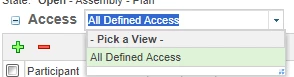
The point is that the table shows information based on a selected view. 

If you select Team Access then you can not see your group

Change the view to all defined access or add the group to the table manually  HelesicPetr_1-1693892679017.png


HelesicPetr_0-1693892653819.png

select the following one view

HelesicPetr_2-1693892742585.png


PetrH


1 reply

HelesicPetr
22-Sapphire II
August 31, 2023

Hi @IA_8904656 

What access are you trying to add? Read/Write to the folder? users should have this rights OOTB if they are added to a Team.

I added full control to a group and the group has the access.

HelesicPetr_0-1693473989602.png


If you expect that adding read/write access to the folder add same rights to other objects as Documents, WTParts CAD Documents then you are wrong

read and write access on the folder do not grant access to other object types in the Windchill.

It does not work as access in Windows


If you want to grant access to the other objects , then you need to specify the access in a Policy Administration for each object type.

HelesicPetr_3-1693474367888.png

HelesicPetr_2-1693474335913.png


PetrH


3-Newcomer
September 1, 2023

Hello,

What access are you trying to add? Read/Write to the folder?

Yes, I created a folder and trying to add a group with R/W access to it. The way I go about it

After creating the folder:

Select the folder – click on actions – manage security – add participants – add the group – apply and ok

When I go back and check the permission on the folder, the group I just added is not listed.

I tried this already several times but to no avail.

Am I doing it right?

Thanks!

Tes Belay
Network Administrator

Korry Electronics Co.

11910 Beverly Park Road

Everett, WA 98204

O) 425-297-9700 ext. 2992

M) 206-229-3791

www.Korry.com


This electronic message transmission is intended only for the use of the party to which it is addressed, including any attachments, contains information from Korry Electronics, which may be privileged, confidential, or protected by law. If you are not the intended recipient you are hereby notified that any dissemination, copying or distribution of this e-mail or its contents is strictly prohibited. If you have received this message in error, please notify us immediately by replying to the message and deleting it from your device. Thank you

HelesicPetr
22-Sapphire II
September 5, 2023

Hi @IA_8904656 

Try to add the group by green plus button+ 

The point is that the table shows information based on a selected view. 

If you select Team Access then you can not see your group

Change the view to all defined access or add the group to the table manually  HelesicPetr_1-1693892679017.png


HelesicPetr_0-1693892653819.png

select the following one view

HelesicPetr_2-1693892742585.png


PetrH