

avillanueva
23-Emerald II
Jan 31, 2024 2:42 PM UTC
Solved

FVItems remain but not tied to Application Data

I am in the file stage of my vault move and clean up. There are 0 files in the remaining folders but a Query Builder report show 50 files remaining.
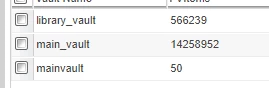
avillanueva_0-1706711668539.png

When I executed a vault WContent verification check and everything comes back clear. No missing files. huh? I created a new report to check the FVItems against ApplicationData and it shows that there is no ApplicationData tied to these FVItems at all. Bad data? I would thing so. All show 0 bytes in the DB too. Now this article says that the CommonScheduleQueue should clear those no worries. Except that I waited a day and nothing. These also have existed for many weeks and odd that the timestamps show recent.  I think my only recourse is to remove the offending lines records right? Is there any other thing that can be tied to these?

avillanueva
23-Emerald II
Feb 1, 2024 12:36 PM UTC

Not quite. I can see that the job ran but there was no result. Odd. I ended up manually removing the 50 lines after backing them up. The remaining vault folders were remove and then the vault was removed so looks like I am all good. I will have to further play with this task since it does not appear to be functioning. One remaining question I have is why is this task running in the commonSchedlingQueue (executes on start up I can confirm) but not in the PurgeUnreferencedFvItemQueue? Perhaps its the age of my system when PTC ditched the queue in favor of the common one. Hmm. Anyway moving on...

6 replies

16-Pearl
Jan 31, 2024 3:21 PM UTC

Are the files in the external file vaults or the BLOBS?
Query ApplicationData for associations to the mainvault.  This article shows the relationships for building the query.
https://www.ptc.com/en/support/article/CS121641


Are they recently created?  Remove Unreferenced Files doesn't typically pick up files created in the last couple of days.  Sometimes I wait a few days and remove unreferenced files again.


It has been a while since I did a full revaulting.  As I recall, revaulting cannot work for missing content files, zero length files, or incomplete business objects.  You may need to manually move them at the DB level.


Translate
avillanueva
23-Emerald II
Jan 31, 2024 6:20 PM UTC

I created this QueryBuilder report to get the data on the 50 FVITEMS:

avillanueva_0-1706724784631.png

ApplicationData to FVItem is outer joined so if the FVItem does not appear in the ApplicationData table, it will show nulls. I am also looking specifically at the the vault I am trying to remove which reports to have only 50 items matching this report. Notice AppData ID is null indicating there is no ApplicationData object referencing this FVItem.  Junk data? 

avillanueva_1-1706724863087.png


Translate