Question
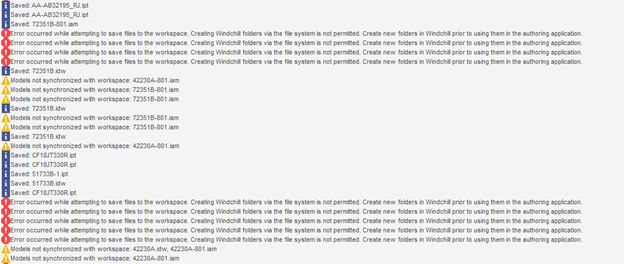
Has anyone seen this error message when using Solidworks WGM to save SW files into PDMLink 10.2?
We've been using Solidworks WGM for several years to manage our SW files alongside Our Creo files - within the last month we are encountering situation where SW files are checked out of PDMLink (10.2), modified, saved in workspace, checked in and modifications disappear - model reverts back to first save made. Drafter has opened models up multiple times worked on them and saved with no problem, then randomly this happens and all work he thought was saved is gone. Has anyone else seen this, or had this happen?

"A larger list of the errors. One thing I noticed is both times after the “error” occured the models are listed as out of SYNC. Yet nothing was done that should have caused them to become out of sync."