12-Amethyst
June 24, 2023
Solved

How Basic life cycle template is promoted

  • June 24, 2023
  • 3 replies
  • 1238 views

Hello,


If we don't link the work flow to basic lifecycle template which automates the process then, how the objects having basic life cycle linked are get promoted?


Br,

Sandeep C.

 

Best answer by buenosroas

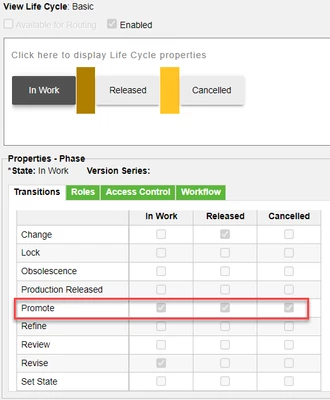
Please note that yout lifecycle must be configured with valid promote targets if you try to use Promotion Request. Here's an example from the OOTB Basic lifecycle template. From the In Work state you see that it is possible to promote to all target states. Each of the states in the template needs to have valid promote states, or you will not be able to use Promotion Request.

buenosroas_0-1687762322319.png

The same goes for Set State. In this example it is not possible to use Set State from In Work to any of the other states. For detailed explanation about "Set State" see https://support.ptc.com/help/windchill/r12.1.2.0/en/Windchill_Help_Center/cadx/CADxEditMenuObjSetState.html#

Bear in mind that to be able to use Set State you also need grant the required permissions using Policy Administration.


I also want to point you to this help article for some more background reading: https://support.ptc.com/help/windchill/r12.1.2.0/en/index.html#page/Windchill_Help_Center/WCAdminOview/WCAdminOviewSetStateVsPromote.html 

3 replies

7-Bedrock
June 24, 2023

Could set lifecycle state manually, or via Promotion Notice


Cliff

HelesicPetr
22-Sapphire II
22-Sapphire II
June 26, 2023

Hi @SC_8321054 

Promotion request Help Center Create Promotion Request

HelesicPetr_1-1687758579155.png


Set State Help Center Set State

HelesicPetr_2-1687758594605.png


PetrH

13-Aquamarine
June 26, 2023

Please note that yout lifecycle must be configured with valid promote targets if you try to use Promotion Request. Here's an example from the OOTB Basic lifecycle template. From the In Work state you see that it is possible to promote to all target states. Each of the states in the template needs to have valid promote states, or you will not be able to use Promotion Request.

buenosroas_0-1687762322319.png

The same goes for Set State. In this example it is not possible to use Set State from In Work to any of the other states. For detailed explanation about "Set State" see https://support.ptc.com/help/windchill/r12.1.2.0/en/Windchill_Help_Center/cadx/CADxEditMenuObjSetState.html#

Bear in mind that to be able to use Set State you also need grant the required permissions using Policy Administration.


I also want to point you to this help article for some more background reading: https://support.ptc.com/help/windchill/r12.1.2.0/en/index.html#page/Windchill_Help_Center/WCAdminOview/WCAdminOviewSetStateVsPromote.html