12-Amethyst
September 25, 2023
Solved

How can Action Performed On property from Work Item be added to a report template?

  • September 25, 2023
  • 1 reply
  • 2482 views

I am trying to create a report template that includes the "Performed On" value found under the Task History section. I was able to find actionPerformedOn under Property Report when looking up wt.workflow.work.WorkItem but cannot find actionPerformedOn when on the "Select or Constrain" tab when created a Report Template.

Any advise it appreciated. TIA

Best answer by HelesicPetr

Hi @mariaSutton 

This page can help you Windchill Reporting Resource (@Marco_Tosin was faster 😄)

and here is many reports created by other users

Resource for reporting


additionally I use jcaDebug=1 for getting detail information about object in tables. 

here is an article how to use it How to use "jcaDebug"

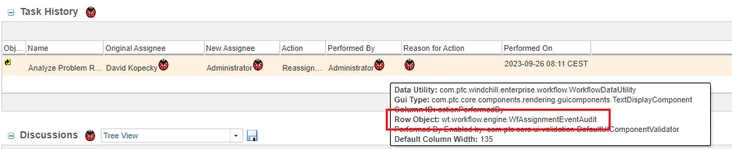
here is example how I found the table

HelesicPetr_0-1695799744945.png

PetrH

1 reply

14-Alexandrite
September 25, 2023

If I understand your question properly, you need to pull in the tabke 'WfVotingEventAudit' which contains the votes, timestamps, comments, etc.  Refer to this article for some guidance: https://www.ptc.com/en/support/article/CS130932 


Be sure to use this great resource too!  Many great ideas and starter queries that you can cater to your specific need.

https://community.ptc.com/t5/Windchill-Tips/Resource-for-reporting/ta-p/817824 

12-Amethyst
September 25, 2023

I am not sure if WfVotingEventAudit is the correct table. The property I am trying to capture can be found when looking at the Task page in Windchill. On the Task page there is a table called Task History; in this table there is a column named Performed On. 

HelesicPetr
22-Sapphire II
22-Sapphire II
September 26, 2023

Hi @mariaSutton 

Can you show it ? just take a screenshot what you are looking for.

PetrH

PetrH