3-Newcomer
July 2, 2024
Question

How do I achieve simulated results of MTBF and MTTR in the RBD? Windchill displays an error.

  • July 2, 2024
  • 2 replies
  • 1048 views

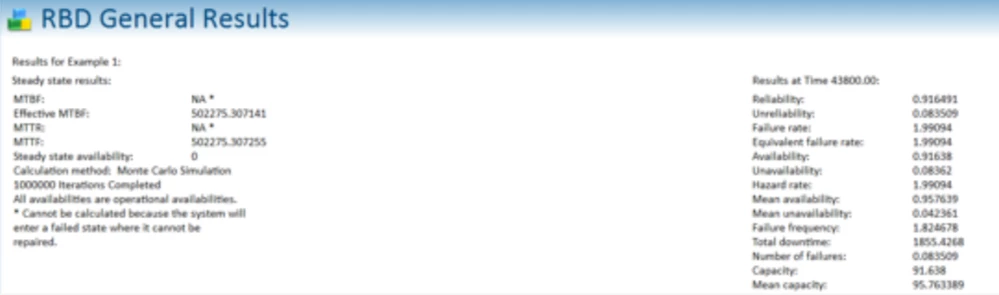
Hi all, this is my first experience with the software. I am currently learning the functions and utilities of the Windchill RBD. At the calculation page, I have been enabled Monte Carlo Simulation method. I am unable to achieve the simulated results. The results page display a message. I am able to obtain the failure rate for this example. It just unable to obtain the MTBF and MTTR of the overall system.

"All availabilities are operational availabilities. *Cannot be operated because the system will enter a failed state where it cannot be repaired"

I read some of the guides including Getting Started Guide. I was still unable to comprehend the error that I encountered. Appreciate the guidance and cheers.

https://community.ptc.com/t5/Windchill/Windchill-Fault-Tree-Analysis-questions/m-p/383375#M44847
 

olivierlp_1-1722351473513.png


olivierlp_0-1722351445257.png


2 replies

Catalina
Community Moderator
July 30, 2024

Hi @NC_11295418,

Thank you for your question!

Your post appears well documented but has not yet received any response. I am replying to raise awareness. Hopefully, another community member will be able to help.
Also, feel free to add any additional information you think might be relevant. It sometimes helps to have screenshots to better understand what you are trying to do.


Thank you for your participation!


Catalina | PTC Community Moderator
12-Amethyst
April 30, 2025

This message is one of the most annoying messages in this tool. Relex and PTC has provided very little to help with it. And this transcends to several modules within the tool.

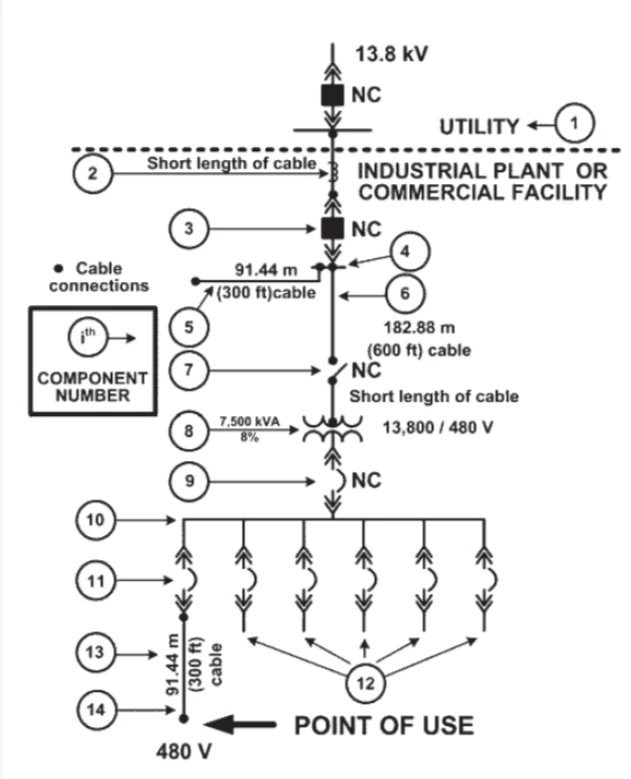
Anyway, it would be good to see your diagram with the accompanying blocks table.

Be sure all your blocks have a failure rate.

Repair times missing, or 0 mins can impact the calculation of MTBF...at least that's what I found.

Attempt setting the "Through end time" well beyond your expected Display results time.

Occasionally, setting "Required Capacity" to 0 helped force the calculation.

Setting "Account for repair in reliability" will force the calculation.


Again, these are tweaks I've made to my model when I get the message...again, very annoying, as the Prediction module will always give you an MTBF.

You can also look at the "Verify RBD Data" function. It identifies where I forget to add critical information that will obviously impact MTBF calculations.


Hope this helps.