1-Visitor
January 6, 2015
Solved

How do I load a previous version drawing and assembly into workspace?

  • January 6, 2015
  • 4 replies
  • 26622 views

Good afternoon:

Can anyone guide me to how I can load a previous version drawing and corresponding assembly model into workspace?

I know how to look at the history tab in the drawing information but I don't know how to open it in Creo.

When ever I try to open a previous version, the drawing updates with the latest part models.

I need the models at the version where the drawing assembly was saved, not the latest.

Creo 2.0 (M090) and Windchill PDM Essentials 10.2 (M010).

Thank you.

~Benito.
Best answer by TomU

You need to add the drawing and related models to your workspace "as stored".

  1. View history of object.
  2. Select desired version.
  3. Now viewing the desired version, choose "add to workspace".
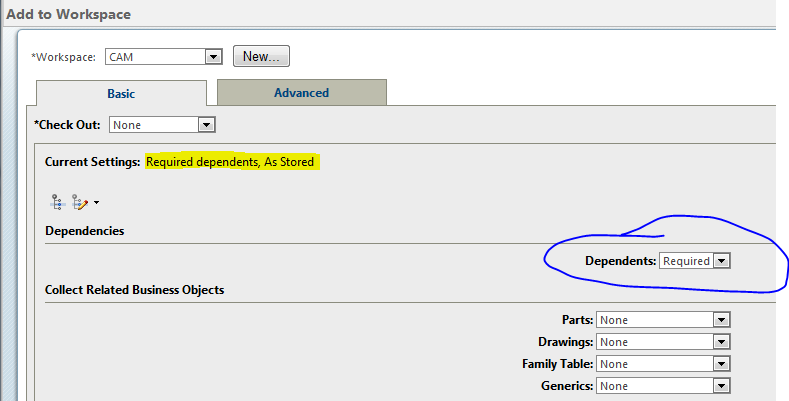
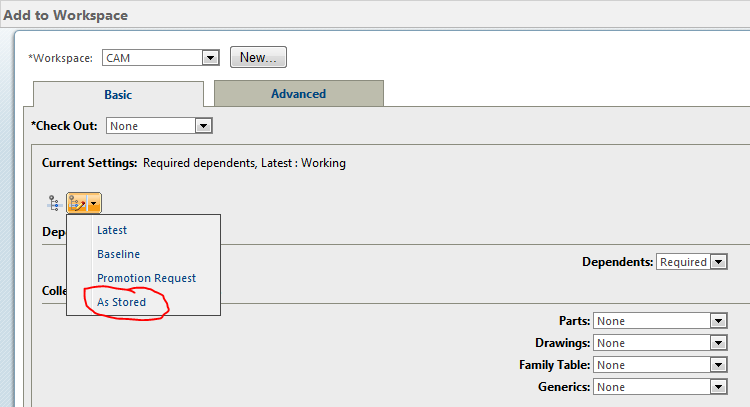
  4. On the add to workspace screen, pick the drop down to change the config spec. to "as stored".
  5. Make sure Dependents is set to "required".
  6. Choose okay to add the items to your workspace.

You will now have the original (out of date) items used for that version of the drawing in your workspace.

10.PNG

11.PNG

4 replies

23-Emerald III
January 6, 2015

You need to do an advanced search and set it to As Saved for the drawing iteration you need, then load that.

Another method is to load the assembly version used by that drawing, using as saved, then load the drawing.

TomU23-Emerald IVAnswer
23-Emerald IV
January 6, 2015

You need to add the drawing and related models to your workspace "as stored".

  1. View history of object.
  2. Select desired version.
  3. Now viewing the desired version, choose "add to workspace".
  4. On the add to workspace screen, pick the drop down to change the config spec. to "as stored".
  5. Make sure Dependents is set to "required".
  6. Choose okay to add the items to your workspace.

You will now have the original (out of date) items used for that version of the drawing in your workspace.

10.PNG

11.PNG

1-Visitor
January 7, 2015

Thank you very much Tom.

Your detailed solution did the trick.

~Benito.

1-Visitor
May 31, 2018

Hi,


Taking As Stored for any previouse version still adds the latest drw/asm to Workspace, please advise why such can happen?

1-Visitor
July 11, 2019

I'm getting this same issue.

1-Visitor
February 3, 2021

Step 1:  How do view the history of the object?

23-Emerald III
February 3, 2021

Go to the information page of the object in Windchill.

One of the tabs is History, 5th from the left, unless your system admin has modified the menu structure.

This will list the dates and times that every revision and iteration has been checked-in to commonspace.