
1-Visitor
February 1, 2016
Question

How do I restart a terminated workflow?

  • February 1, 2016
  • 3 replies
  • 2334 views

Can anyone tell me how I can restart the workflow? The "Sync on CA Complete" was terminated by mistake. When it terminated the" Admin Override VCN" was Terminated automatically.

Can anyone suggest how I would go about restarting this workflow?


I know that the process that was terminated can't be restarted, but is it possible to go back a step and restart from there or does the entire process have to be recreated?
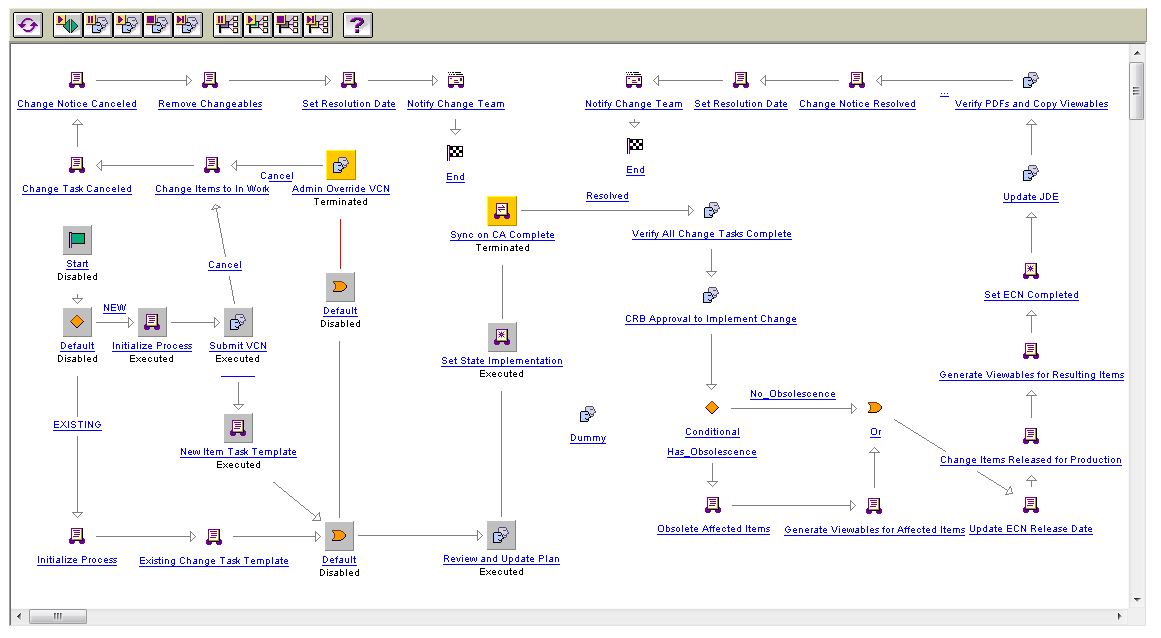
terminated.JPG

3 replies

1-Visitor
February 1, 2016

I'm thinking you'll need to restart completely, either by reassigning life cycle or set state.  You can bump it forward through the process manager utility.  All comments and votes captured will be in the previous process, so if that's important you may want to notify participants about the repeated workflow.  

12-Amethyst
February 1, 2016

Go to Queue management.

Scroll down and enter WFUserWorkQueue

Restart the failed jobs.

If you have a lot of them it will take some time but if you've corrected the error it should advance once that job is restarted.

sconrad1-VisitorAuthor
1-Visitor
February 2, 2016

Thank you for your replies. We just deleted the entire process and started it again. I will have to try your suggestions if we come into this issue again.