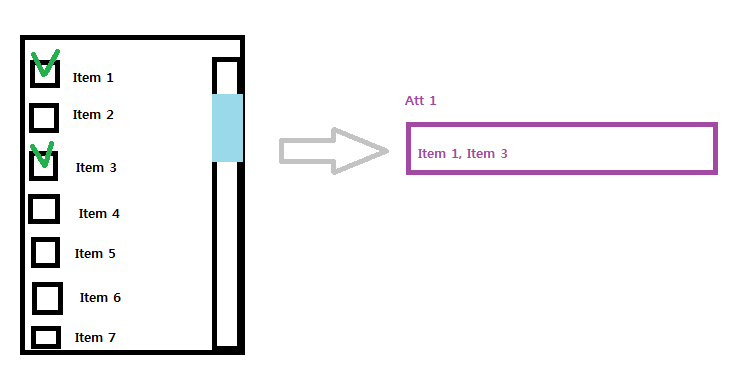
Use a Table element with a single column. Remember to fully initialize the Table before you display it. Also remember to put any custom images you want into preload elements (just declare them in the res-file.)
Declare a bool array (or plain int array) that contains the "checked" state for each button. Make it static. Remember to initialize it.
To the Table element you can programmatically add Checkbuttons via ProUITableCheckbuttonAdd(). Use a component name that contains the item number.
Use ProUICheckbuttonActivateActionSet() to set an action for each Button. Give the item number as the "data" component (remember to cast it to ProAppData - pass the number, NOT a pointer to the number!). You can use the same action for each button - with differing inputs, of course.
In that action, manipulate the appropriate entry in your state array (remember to correct for offset - Item 1 to array[0] and so on)
Benefit!
If you want you can also trigger a function that updates a label (or something else) that shows which items have been selected.
Use a Table element with a single column. Remember to fully initialize the Table before you display it. Also remember to put any custom images you want into preload elements (just declare them in the res-file.)
Declare a bool array (or plain int array) that contains the "checked" state for each button. Make it static. Remember to initialize it.
To the Table element you can programmatically add Checkbuttons via ProUITableCheckbuttonAdd(). Use a component name that contains the item number.
Use ProUICheckbuttonActivateActionSet() to set an action for each Button. Give the item number as the "data" component (remember to cast it to ProAppData - pass the number, NOT a pointer to the number!). You can use the same action for each button - with differing inputs, of course.
In that action, manipulate the appropriate entry in your state array (remember to correct for offset - Item 1 to array[0] and so on)
Benefit!
If you want you can also trigger a function that updates a label (or something else) that shows which items have been selected.

 checked Item value into input box.