
4-Participant
July 2, 2024
Solved

How to add new types in global search (Windchill)

  • July 2, 2024
  • 2 replies
  • 971 views

Version: Windchill 12.1


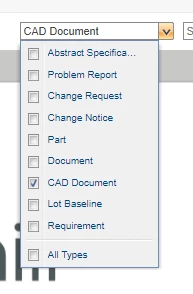
Use Case: I want to search the process plan by number using Windchill's global search


Description:

I already checked the optional attributes types for the search and the Process Plan is not there. Is there any way to add it, maybe through an xml file or something like that.image.png
 

Best answer by Shashwath

Hello,


Login to Windchill as Administrator> Site > Utilities > Preference Manager > Search > All Applicable Object Types Search > Add


Shashwath,

2 replies

avillanueva
23-Emerald I
23-Emerald I
July 2, 2024
Shashwath12-AmethystAnswer
12-Amethyst
July 3, 2024

Hello,


Login to Windchill as Administrator> Site > Utilities > Preference Manager > Search > All Applicable Object Types Search > Add


Shashwath,