14-Alexandrite
September 19, 2022
Solved

How to change character encoding in windchill
  • September 19, 2022
  • 6 replies
  • 2946 views

onur_0-1663579241635.png

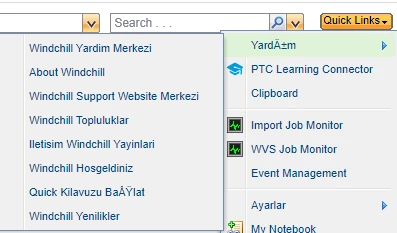
I'm trying to make my windchillda menus in Turkish, but it doesn't read Turkish characters. I added encoding utf-8 to navigation xml files, but it didn't work. How else can I do?

Best answer by HelesicPetr

@OnurNalbantoglu 
Ha, so you use the RBInfo definition. It is very important information.


In that definition you have to use different character definition. The correct one is UNICODE. It is not encoding of file it is definition of characters.

So you need to find UNICODE definition of your language characters and use it in you source files.

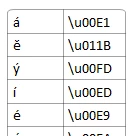
my example is:

HelesicPetr_0-1663591163635.png


so instead of "á" I use "\u00E1" and so on...

PS> your characters unicode-table


PetrH

6 replies

HelesicPetr
22-Sapphire II
September 19, 2022

Hello @OnurNalbantoglu 

You need to ensure that the file is saved in encoding UTF-8, just adding  it in XML file is not enough

Use notepad++ to change encoding of file.


RBInfo files are better solution for description in different languages,.

 example: Action_Localizing_actions


PetrH

14-Alexandrite
September 19, 2022

all files are saved in utf-8 format but still not working

HelesicPetr
22-Sapphire II
September 19, 2022

Hi @OnurNalbantoglu 

What character do you use and have a trouble ?

I use a "Ğ" and the character is shown correctly with UTF-8


HelesicPetr_0-1663590481917.png

HelesicPetr_1-1663590498865.png

PetrH

14-Alexandrite
September 19, 2022

Turkish characters:

ğ => \u011f
Ğ => \u011e
ı => \u0131
İ => \u0130
ö => \u00f6
Ö => \u00d6
ü => \u00fc
Ü => \u00dc
ş => \u015f
Ş => \u015e
ç => \u00e7
Ç => \u00c7