
15-Moonstone
February 17, 2017
Solved

How to create an Agreement

  • February 17, 2017
  • 1 reply
  • 2272 views

Hi.

Within Security Labels Configuration file I included a tag for Agreement Configuration.

AgreementConfiguration enabled="true">

    <AgreementManagersGroup>

        <groupUfid>cn=Agreement Managers,ou=people,cn=AdministrativeLdap,cn=Windchill_10.2,o=xyz|Ldap.corp.xyz.com|Ldap.corp.xyz.com</groupUfid>

    </AgreementManagersGroup>

I then created a group called as Agreement Managers in Site Utilities and then added a user to that group.

However when i login with that user i am not able to find any icon to create a new agreement ? Can you please let me know if my process is right ? If not can you please let me know how to create the same ?

Thanks and Regards,

Aditya Achanta
Best answer by rhart

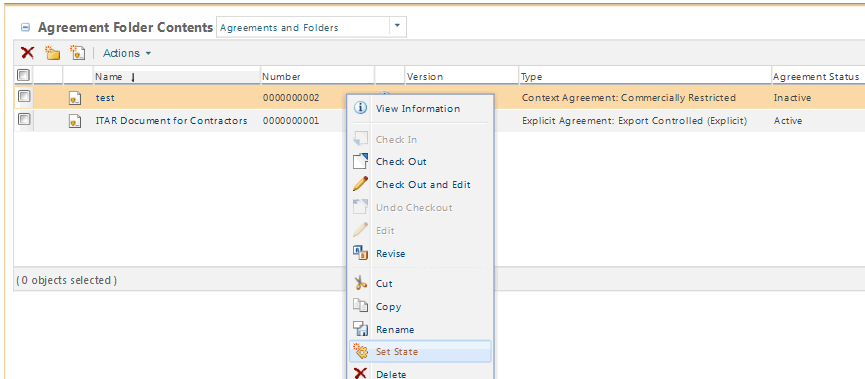
Hi, if the user has the right access, they can set state.

2017-02-20_092135.bmp

Regards

Rob

1 reply

16-Pearl
February 17, 2017

Hi Aditya,

You should see Agreements in the product container, the link takes you to the Agreement Folder, and that's where you find the New Agreement button. so A policy is also needed for the user to be allowed to create that type, or just put him in the product manager group to test.

2017-02-17_135323.bmp

2017-02-17_140137.bmp

Regards

Rob

aachanta15-MoonstoneAuthor
15-Moonstone
February 20, 2017

HI Rob,

Thank you. I had created an agreement. However it is in Inactive state.

How to make it active ? Can you please let me know about it ?

Thanks and Regards,

Aditya Achanta

rhart16-PearlAnswer
16-Pearl
February 20, 2017

Hi, if the user has the right access, they can set state.

2017-02-20_092135.bmp

Regards

Rob