
1-Visitor
August 27, 2015
Question

How to disable "Revise & Cheked out now" option?

  • August 27, 2015
  • 11 replies
  • 4610 views

Dear All,

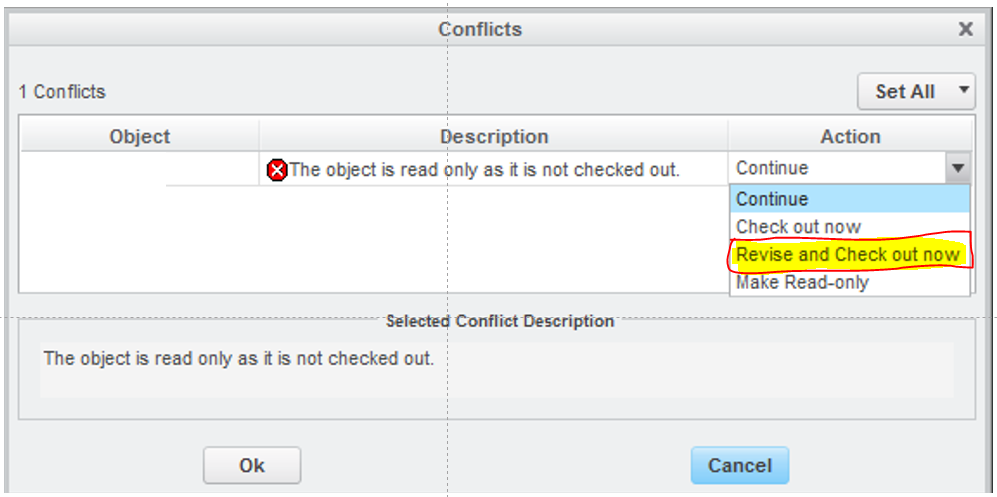
I am using PTC Creo 2.0 with windchill integration. But every time opening big assembly it pop up below dialog box. Many times my team members pressed OK & all assemblies are revised and checked out & creates a lots of trouble for me. I want to disable Revise and Check out now option. Please do needful
11 replies

13-Aquamarine
August 27, 2015

I don’t believe you can disable the menu action in CAD, we tried hard to do that because we want all revisions be controlled by the Change Process. However I am pretty sure you can prevent the action from being successful using access control rules. That is what we did, but it has been a while and it will take some research for me to remember how we accomplished that. Let me know if you need that and I will get you some answers.

jthakor1-VisitorAuthor
1-Visitor
August 27, 2015

Thanks Lewis for your feedback.

You can give your suggestion and we will see how we can implement the same.

Thanks,

jitu

12-Amethyst
August 27, 2015

Hi,

I do not see why it is complicated to prevent users to be perform a Revise and Check Out thanks to the Access Control.

I agree you can't change the menu, you can set the default value though.

For Access Permissions, simply do not allow Revise for EPMDoc for the Release state for that role/usergroup.

When user try to Revise they will get an error message.

This make me think that of a new idea.  Link Creo Menu to ACL, so if user is not allowed to Revise, then the option is not provided in the menu...

16-Pearl
August 27, 2015

Jitu

You can change the default in the dialog you have shown to "continue" via the config.pro option

dm_checkout_on_the_fly continue

It doesn't disable the checkout and revise now, but it helps to reduce the unintentional revise of objects.

Regards,

DN

12-Amethyst
August 27, 2015

Thanks Daniel

I could not remember the option from top of my head.....