
16-Pearl
March 2, 2023
Question

How to do modelcheck on parts that conflict manager showed

  • March 2, 2023
  • 1 reply
  • 1053 views

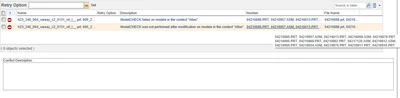
Hello, working in PTC Creo with Windchil the most often error while checking in is parts/assemblies that hasn't had modelcheck status True while checking in. How to perform modelcheck on this parts?
ilyachaban_0-1677755651575.png


Yes, I can do it manually by finding and opening each part one by one, but how to collet all this items and perform modelcheck on all of them at once? 


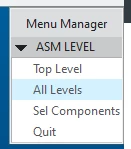
There is one big assembly that I want to check in. When i perform modelchek on whole assembly I do it this way for interactive modelcheck:
ilyachaban_1-1677755743466.png

It collects all the model which is active in this particular assembly. But sometimes there are suppressed models/assemblies that modelcheck doesn't collect and at the end result it can't check anythin in. 


Thank you in advance.


1 reply

23-Emerald III
March 2, 2023

My users complain of this all the time, too. 

I have found no way to do it 'automatically' so I tell them to just go through the model structure and run ModelCheck interactively. In some cases, I have found the lower level models were created before we turned ModelCheck on and were checked in without all of the required parameters being set. It is a pain, but once the objects have been updated, they should check in without issues in the future.

If there is something that PTC can recommend to make ModelCheck more user friendly in this area, please let us know.

16-Pearl
March 3, 2023

We are working with Windchill more than 10 years and we didn't find the way around this problem the only hope is PTC Community)