18-Opal
March 10, 2017
Solved

How to enter Due Date in a Change Activity?

  • March 10, 2017
  • 2 replies
  • 3570 views

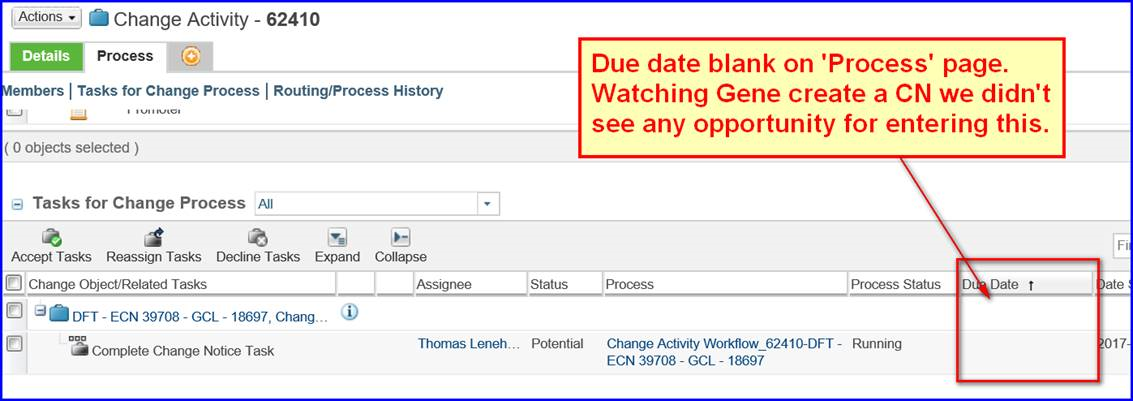
So we currently use Change Management in Windchill to manage our engineering changes, and have noticed that there appears to be a date field in the change activity that never gets filled out.   I am curious as to what this date field is for and how to get it to populate with data?   (See attached screenshot for details.)

-marc
20170310-112910.png

Best answer by BenPerry

Marc DeBower‌,

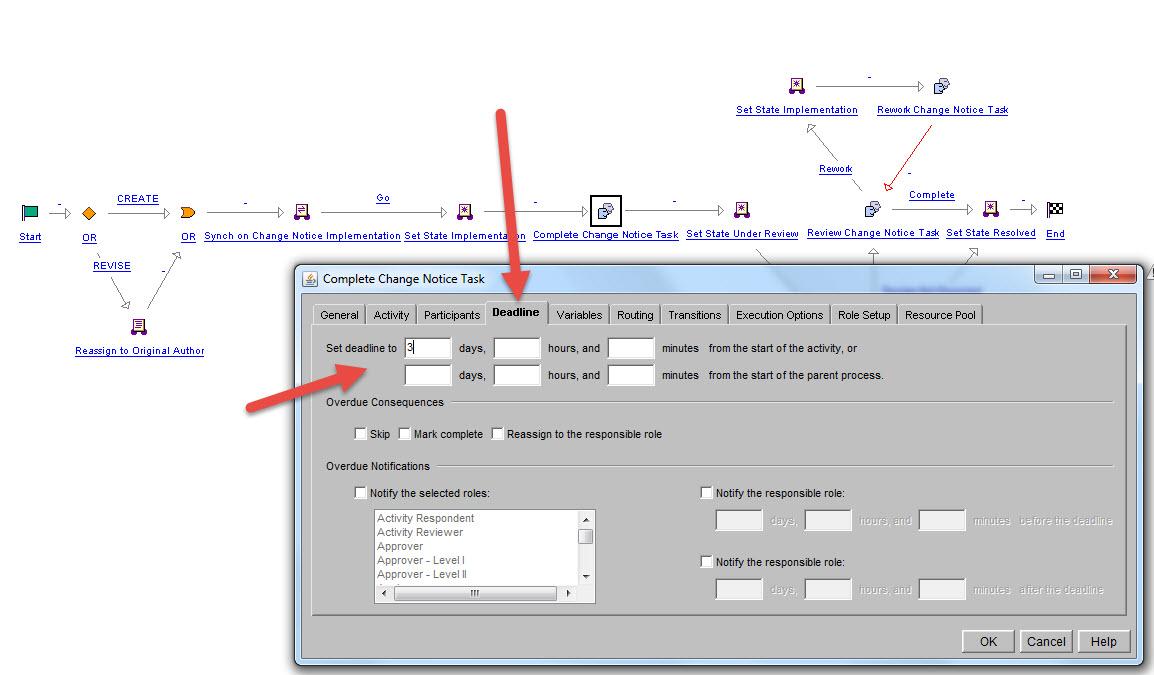
That is the Due Date or Deadline of each particular workflow task, when you enable deadlines on your tasks.  You can have some tasks with deadlines, and some tasks without deadlines.

A few cautions ... Windchill's functionality is a little weak in this area.  It doesn't take into account working hours.  So if the deadline is 3 hours, and the user receives a workflow task at 4:00 PM, it will be overdue at 7:00 PM.

2017-03-11_6-18-01.jpg

2 replies

BenPerry15-MoonstoneAnswer
15-Moonstone
March 11, 2017

Marc DeBower‌,

That is the Due Date or Deadline of each particular workflow task, when you enable deadlines on your tasks.  You can have some tasks with deadlines, and some tasks without deadlines.

A few cautions ... Windchill's functionality is a little weak in this area.  It doesn't take into account working hours.  So if the deadline is 3 hours, and the user receives a workflow task at 4:00 PM, it will be overdue at 7:00 PM.

2017-03-11_6-18-01.jpg

mdebower18-OpalAuthor
18-Opal
May 12, 2017

Finally had a chance to test this and it works just like Ben describes.  My only hang up was I started looking in the Change Notice Workflow not the Change Activity Workflow.

However, if you want to set a deadline for the default Audit task, you will need to modify the Change Notice Workflow.

Change Activity Workflow:

  • Change Notice Tasks
  • Review Tasks

Change Notice Workflow:

  • Audit Task
16-Pearl
March 13, 2017

Hi Mark,

You can also edit the deadlines manually, the Product Manager can edit them in the Tasks table, then overdue tasks get highlighted red. I looked for a way to grant permission for other users but I can't find any.

2017-03-13_153614.bmp

Regards

Rob

15-Moonstone
March 14, 2017

Very cool, Robert Hart‌.  I have never seen that before.  Thanks for sharing.