

11-Garnet
October 27, 2017
Question

How to Expand ECN Comments View Text Box

  • October 27, 2017
  • 2 replies
  • 4366 views

We use the comments field on New Change Tasks to write lengthy descriptions on each object that will be changed on the ECN.

Out of the box, this field is quite small and only displays a partial view of the text that is entered.  This makes it hard to proofread comments and view formatting.
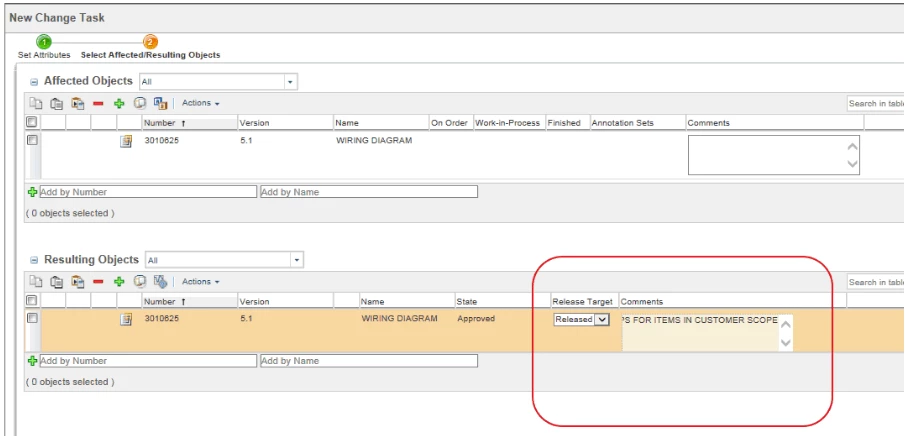
2017-10-27 13 19 33.png


Is there anyway to make this text box bigger so that more of the text is visible?

We are on Windchill 11.0 M20.


Thanks in advance for any suggestions.

2 replies

1-Visitor
October 7, 2019

@zgodula 

Don't know if you ever got helped, but Wrap Text is available and probably will solve your issue.  Select the pull down arrow on any column and select Wrap Text.


James

wrap.png

21-Topaz I
October 7, 2019

@JHall 

I believe @zgodula is talking about when editing the Task.  Not in one of the tables on the details page of the change.


I do not believe this can be done but this is one of my peeves about a change.  Why does PTC think that small box is all we need?

1-Visitor
October 7, 2019

@STEVEG 

Ugh, I don't know, but I tend to complete my comment in a notepad window, cut and paste it into that ridiculously small box.  I wish it could be expanded as each user wanted.


Jams

5-Regular Member
October 7, 2019

I suspect this may be related to this known issue:


https://www.ptc.com/en/support/article?n=CS214887


21-Topaz I
October 7, 2019

Nope.  That doesn't work.