
15-Moonstone
March 22, 2022
Solved

How to increase the sizes of Resulting Objects window?
  • March 22, 2022
  • 2 replies
  • 4550 views

JS_9824412_0-1647973556011.png

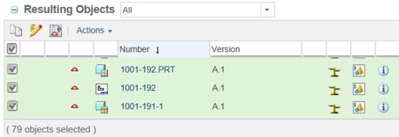
Want to exam the list of Resulting Objects, however, the window size is too small. Each time there are only 3 or 4 objects can be shown. If the list is long, the side scroll bar doesn't care and consistently presents some portion of the list at snail speed.


Is there any way to open up a large sized (popup) window of the Resulting Objects?

Best answer by STEVEG

After creating your own tab you go to the upper right and select the Customize button.  Add any table you want.

2 replies

21-Topaz I
March 22, 2022

As far as I am aware there is not a way to open it in its own window.


As a side note, you are aware you can make the tables longer?  You move your mouse over this line at the bottom of the table.

STEVEG_0-1647974431955.png


15-Moonstone
March 22, 2022

If this is the only option, I will have to use it. Each dragging move can only open a little bit. The dragging move is always stopped by the border at the bottom of screen. Have to repeat "dragging move down + Roll Up" for many times to open fully. It works though.

20-Turquoise
March 22, 2022

You can also collapse other tables on the same page eg the Affected Objects table by selecting the Collapse Table icon "-"

16-Pearl
March 22, 2022

Hello,


I do not have concrete answer however I can give you some directions. Each actions and its page is governed by model actions. Please find the action for resulting Window (if any) possibly in ChangeManagement-actions.xml and  change the Window type to popup/new


e.g. This action is just as an example and may not be exact action. 


From
<action name="collectItems_ResultingItems" renderType="GENERAL" selectRequired="true">
<description>Collect items to be added to the resulting objects</description>
<command onClick="openCollectorPicker(&apos;CollectItemsFromChange_ResultingItems&apos;,event)" windowType="no_content"/>
</action>


To 


<action name="collectItems_ResultingItems" renderType="GENERAL" selectRequired="true">
<description>Collect items to be added to the resulting objects</description>
<command onClick="openCollectorPicker(&apos;CollectItemsFromChange_ResultingItems&apos;,event)" windowType="popup"/>
</action>


Let me know how it goes.

15-Moonstone
March 22, 2022

Where to find and edit this ChangeManagement-actions.xml? Where to save the change? I am just an end user of CREO and Windchill, and am not an administer. 

21-Topaz I
March 22, 2022

Normally you wouldn't be able to do this as a standard user.