13-Aquamarine
April 13, 2023
Solved

How to install openDJ with windchill

  • April 13, 2023
  • 1 reply
  • 2983 views

How to install openDJ with windchill and how to do import and export openDJ?

@HelesicPetr @BenLoosli @TomU 


Best answer by mmeadows-3

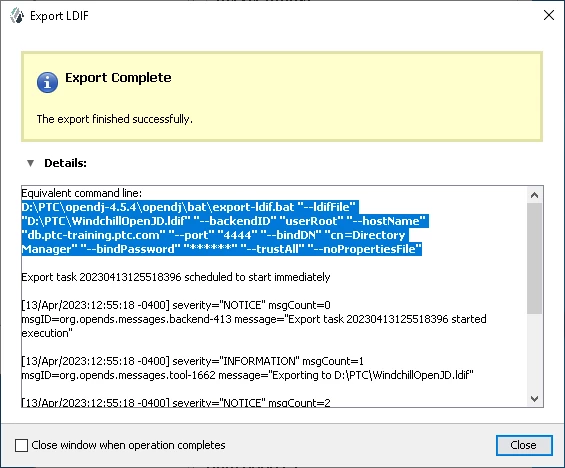
If you use OpenDJ Control Panel to perform a manual export, the UI will show the syntax of the export command.  You can turn that into a script and run as needed.


OpenDJExport.PNG


The GUI is notorious for slipping in unicode characters.  So be prepared to replace spaces and dashes in your standard text editor.  Also, most double quotes are unnecessary.

D:\PTC\opendj-4.5.4\opendj\bat\export-ldif.bat --ldifFile D:\PTC\WindchillOpenJD.ldif --backendID userRoot --hostName db.ptc-training.ptc.com --port 4444 --bindDN "cn=Directory Manager" --bindPassword password --trustAll --noPropertiesFile

1 reply

16-Pearl
April 13, 2023
SModugu13-AquamarineAuthor
13-Aquamarine
April 13, 2023

this is helpful. we have already implemented WC12.0 with OpenDJ and running fine.

but we want to export openDJ every week as part of Back up activity. in short, we want to make the backup of openDJ LDAP every week and save in another location.

do you have any short notes on process of making export or back up of openDJ periodically?

16-Pearl
April 13, 2023

If you use OpenDJ Control Panel to perform a manual export, the UI will show the syntax of the export command.  You can turn that into a script and run as needed.


OpenDJExport.PNG


The GUI is notorious for slipping in unicode characters.  So be prepared to replace spaces and dashes in your standard text editor.  Also, most double quotes are unnecessary.

D:\PTC\opendj-4.5.4\opendj\bat\export-ldif.bat --ldifFile D:\PTC\WindchillOpenJD.ldif --backendID userRoot --hostName db.ptc-training.ptc.com --port 4444 --bindDN "cn=Directory Manager" --bindPassword password --trustAll --noPropertiesFile