
8-Gravel
May 19, 2019
Solved

How to Integrate AutoDesk Inventor with Windchill Workgroup Manager

  • May 19, 2019
  • 2 replies
  • 8156 views

Hi all,

I am using AutoDesk Inventor from long time. now we are looking for Integrate AutoDesk Inventor with Windchill.

Can anyone please share technical information!  to begin like..

- I mean what's procedure for this? We already using having Windchill and using with Creo 3.0.

- Does we need to purchase a special license from PTC Windchill supplier or from AutoDesk Inventor to start.


Thank you very much in advance,

Best regards,

Dnyaneshwar Maid
Best answer by JHall

@dnyanesh_maid 

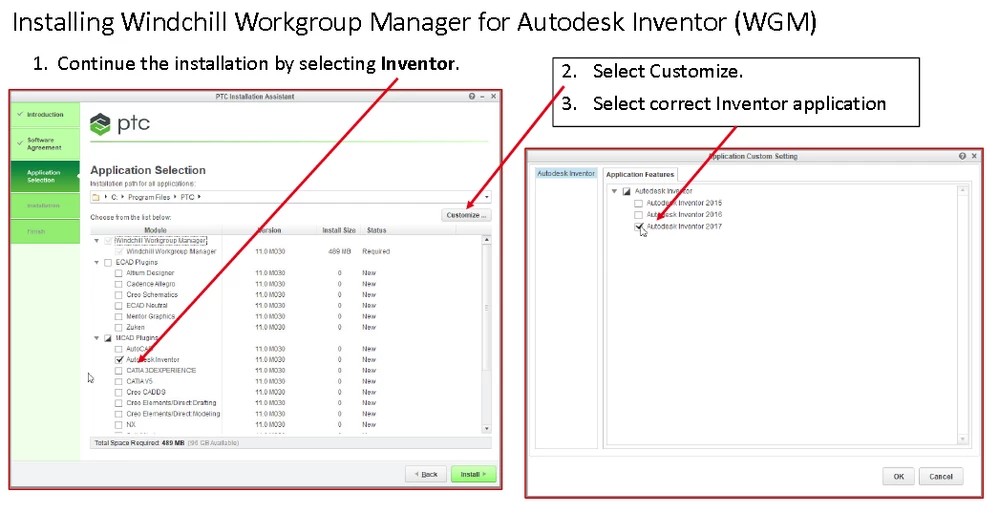
If you already have Inventor licences, I don't think you need new ones. When you install WGM for Inventor, it sees Inventor and you simply select it and it will create the links to the program.  You do this during the installation process.

It's really easy, see the screen shot.

Install_WGM.png

2 replies

1-Visitor
May 20, 2019

@dnyanesh_maid 

Greetings,

There are a couple things to consider.  You may have to buy a license of Inventor for your CADworker on Windchill, also you will need to have it set up correctly to publish your models/drawings as you wish.

@unknown  Gave a good link for information as well.  I've found downloading the Workgroup Manager and installing it to be mostly trouble free.  You do  have to be careful of Windows 10 updates and Windows OneDrive can cause the PTC file system to have trouble and you are unable to access the objects in local workspaces.  However the newer CPS of Workgroup Manager seems to help a lot.

James


8-Gravel
May 21, 2019

Thank you for reply.

Still I am not 100% clear.

I got your point that we need to purchase a Windchill Workgroup Manager (WGM) license for Integration with AutoDesk Inventor from PTC. This my understanding is correct?

Now does we need do something with or ask to AutoDesk inventor License? I mean we are already having AutoDesk Inventor License and also Windchill with WGM for Creo 3.0. In this case I think I only need to buy WGM license for AutoDesk Inventor. Correct?

Thank you again in advance.


Best regards,

Dnyaneshwar Maid


JHall1-VisitorAnswer
1-Visitor
May 21, 2019

@dnyanesh_maid 

If you already have Inventor licences, I don't think you need new ones. When you install WGM for Inventor, it sees Inventor and you simply select it and it will create the links to the program.  You do this during the installation process.

It's really easy, see the screen shot.

Install_WGM.png