garettpatria
3-Newcomer
April 15, 2026
Solved

How to mass populate rename fields in Windchill

  • April 15, 2026
  • 2 replies
  • 36 views

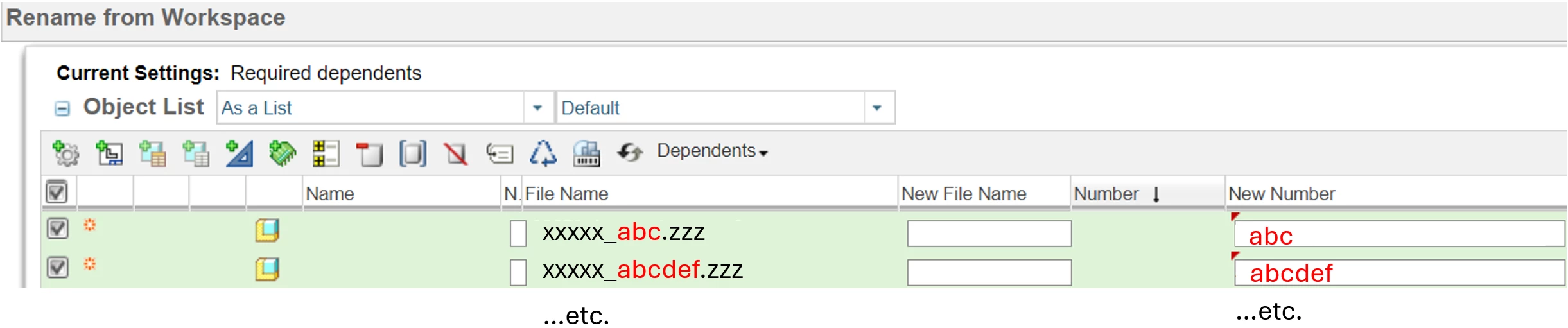
I need to populate the New Number field for thousands of parts/assemblies in Windchill. See attached example: The New Number simply needs to be the string between the first underscore and the file extension of the File Name field (red font). I hope I don’t have to individually copy paste each of these. 
 

Best answer by HelesicPetr

Hi ​@garettpatria 

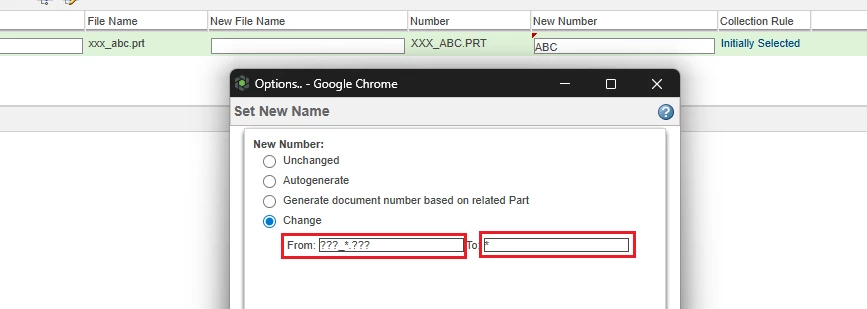
If your xxxx string has a same size, then you can use the ? character in the mass rename function.

The one ? is equal to a character.

Example ???_ABC.??? to * 

then the result is ABC


PS: you can not use the * char because the system always chose the first one to keep it as a result :D 

2 replies

avillanueva
23-Emerald I
23-Emerald I
April 15, 2026

I am not sure something that can be done in that UI given the sheer volume you are dealing with. The tool does have a way to do some simple patterns. I would recommend using a command line rename script to handle this. I have a few I wrote for this very case. Feed it a CSV file and let it chunk away at it. Knowledge base has this this article:

Which API can be used to change or rename the identity of several Objects in Windchill PDMLink

HelesicPetr
22-Sapphire II
22-Sapphire II
April 16, 2026

Hi ​@garettpatria 

If your xxxx string has a same size, then you can use the ? character in the mass rename function.

The one ? is equal to a character.

Example ???_ABC.??? to * 

then the result is ABC


PS: you can not use the * char because the system always chose the first one to keep it as a result :D