
14-Alexandrite
April 11, 2023
Solved

how to optimize the configuration to make creo use less network?

  • April 11, 2023
  • 2 replies
  • 1256 views

When I use croe, work with windchill use the local workpace, 

Almost every action need to wait seconds:

like opend workspace : 14 seconds

open a part to a new window from a assembly : around 5 seconds

replace a part in assembly model :15 secods (after i click the confirm button).

I check the  task manager, looked creo use the network for very step.
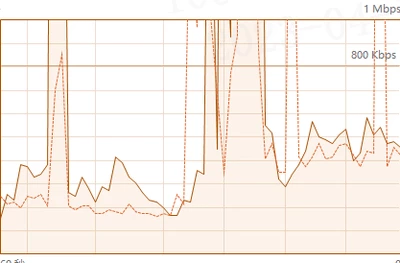
liboME_1-1681182589624.png

Would anyone know the reason?

Am I use wrong configuration ? how can I optimize it?


Thanks in advance!



Best answer by Marco Tosin

This is a summary article on how to configure Creo with Windchill


https://www.ptc.com/en/support/article/CS63620


2 replies

Sulibo14-AlexandriteAuthor
14-Alexandrite
April 11, 2023

this is nomal situation :

liboME_3-1681196791497.png


21-Topaz I
April 11, 2023

Are you working on a VPN? Have you tried eliminating that to see if it a source of the extra traffic you aren't expecting?


You might want to check out these creo config options:


dm_cache_limit 0
dm_save_as_attachment no
dm_synchronize_in_background yes
dm_network_threads 6
Marco Tosin
21-Topaz I
21-Topaz I
April 11, 2023

This is a summary article on how to configure Creo with Windchill


https://www.ptc.com/en/support/article/CS63620


Marco