
1-Visitor
December 31, 2015
Question

How to remove all OOTB content from Process Notification email triggered by Notification Robot

  • December 31, 2015
  • 3 replies
  • 1475 views

Hi All,

I want to plain email message body without any OOTB contents, as like shown in below image.
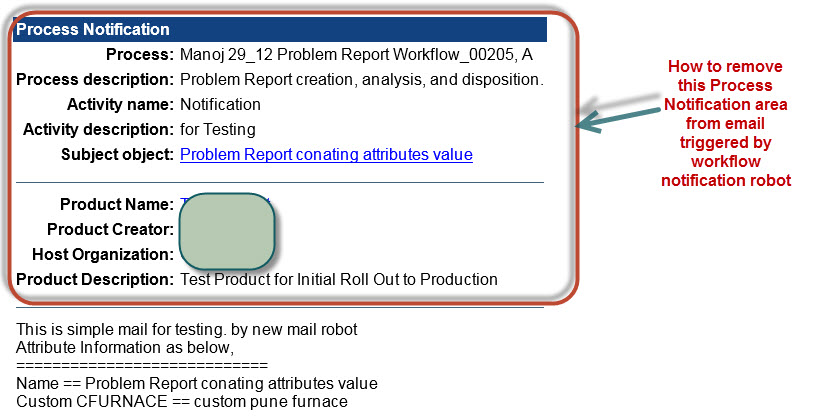
emailnotification.jpg

to achieve my requirement, which templates  have to modify ? if i modified the templates, then all email notification will get affected who are using this template ?

or can we create a separate new template for this.

Any help will be grate.

Wish you very happy new year to all.

Regards,

Vivek

3 replies

1-Visitor
December 31, 2015

All workflow activity emails use the same template which is in \Windchill\codebase\templates\workNotification\General_en_US.html. If you want to modify it specific to this assigned activity, you can uncheck send notification and add a notification robot to get executed at the same time as the activity. In the notification you can select a custom message template. you can create a custom template and save it under \Windchill\codebase\templates\workNotification\


Have a very Happy New Year!


Thank you

Binesh Kumar

16-Pearl
January 18, 2016

Hi Vivek,

If this is only for a particular workflow and if you are looking only to have a plain text message, you can very well send an email using java/webject code from an expression robot instead of customizing the templates.

Regards,

Bhushan

1-Visitor
January 18, 2016

Vivek ,

One alternative you could explore, Disable the email notification for activity assignment, In Activities start transition call write custom class to send the email notification using java.mail or mailhelper.

You will get more control on email body what contain you want to send in email.  However this approach will not work for activities reassignment you many need to find out some other workaround for activity reassignment


Thanks

Shreyas