
18-Opal
September 1, 2015
Solved

How to search for a representation by name?

  • September 1, 2015
  • 2 replies
  • 3605 views

Hey, 

I need to find all CAD Document representations named batch and delete them.  Any good ideas on how to go about that?

System: Windchill 10.1 m040
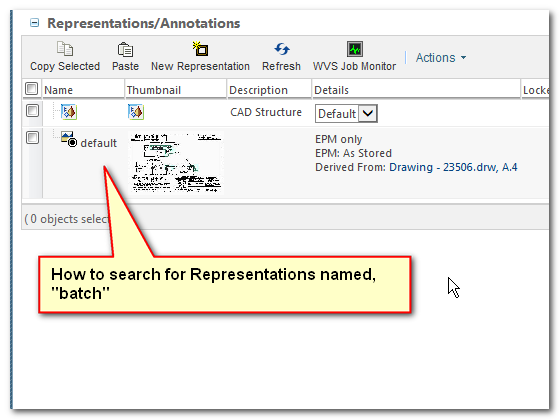
20150901-115320.png

Thanks for the help,

-marc

CAD / PLM Systems Manager

TriMark Corporation

Best answer by BineshKumar1

Mark - I think you can use delete rep utility - https://support.ptc.com/appserver/cs/view/solution.jsp?n=CS62748

Matt has detailed it here Re-publish ideas needed

Thanks

Binesh Kumar

Barry Wehmiller

2 replies

1-Visitor
September 1, 2015

Mark - I think you can use delete rep utility - https://support.ptc.com/appserver/cs/view/solution.jsp?n=CS62748

Matt has detailed it here Re-publish ideas needed

Thanks

Binesh Kumar

Barry Wehmiller

16-Pearl
September 1, 2015

I tried to use this utility 3 years ago with no success...PTC drug their feet for months, then moved the case to R&D.  Then they came back with "it's an unsupported utility".  I had to enlist the help of our outside consultants who wrote a quick little program that deleted all reps name batch.  Supreme frustration with PTC at that point.  Good luck with the utility.

1-Visitor
September 1, 2015

Hi Greg, I ran it for a couple of occasions it deleted the reps, but i had to do some tweaks. I have faced some memory issues and faced some deadlock as well. I am curious to know - did the utility run when you tried or was is doing a partial deletion?

Thanks

Binesh Kumar

Barry Wehmiller

mdebower18-OpalAuthor
18-Opal
September 3, 2015

Just to wrap things up,  I was able to use a SQL query to find all the representations named batch and then use the DeleteRepUtil to delete them.  I chose to use this method because it was faster and had less impact on the running production server.  The same results could be achieved using just the utility, but it was much more resource intensive and disruptive to the server and user performance was noticeably affected.

My Procedure:

  1. Log into DB server
  2. Start MS SQL Server Management Studio
    1. Login as db user
  3. Run SQL query
  4. Save results to text file.
  5. Copy text file to APP server.
  6. Break single large text file into smaller files of approximately 5000 lines each as needed to minimize impact to performance.
  7. Start Windchill shell
  8. Run DeleteRepUtil  with the -f option to read the file.

SQL Queries:  (Note, I am new to SQL, and borrowed heavily from the Community to put this together.  Also there may be better ways to accomplish the same thing...)

SQL Query (Product):  Change name for each product to run this against.

select

  derived.idA2A2

from

  DerivedImage derived, WTPart part , PDMLinkProduct prod

where

  part.idA2A2=derived.idA3theRepresentableReferenc and

  part.idA3containerReference =prod .idA2A2 and

  prod.namecontainerInfo ='<product name=">' and

  derived.name='batch'

Union All

Select

  derived.idA2A2

from

  DerivedImage derived, EPMDocument epmdoc , PDMLinkProduct prod

where

  epmdoc.idA2A2=derived.idA3theRepresentableReferenc and

  epmdoc.idA3containerReference =prod .idA2A2 and

  prod.namecontainerInfo ='<product name=">' and

  derived.name='batch' ;


SQL Query (Library): Change name for each library to run this against

select

  derived.idA2A2

from

  DerivedImage derived, WTPart part, WTLibrary lib

where

  part.idA2A2=derived.idA3theRepresentableReferenc and

  part.idA3containerReference=lib.idA2A2 and

  lib.namecontainerInfo='<library name=">' and

  derived.name='batch'

UnionAll

Select

  derived.idA2A2

from

  DerivedImage derived, EPMDocument epmdoc, WTLibrary lib

where

  epmdoc.idA2A2=derived.idA3theRepresentableReferenc and

  epmdoc.idA3containerReference=lib.idA2A2 and

  lib.namecontainerInfo='<library name=">' and

  derived.name='batch';

Note:  Replace <library name="> with name of library.   Likewise for <product name=">, replace with name of product.

Sample utility line syntax:

windchill com.ptc.wvs.server.util.DeleteRepUtil -f D:\20150902-batchreps\batchreps01.txt -u siteadmin -p password -q