
1-Visitor
March 3, 2016
Question

How to set the default change task description to be different from the change notice description?

  • March 3, 2016
  • 6 replies
  • 3093 views

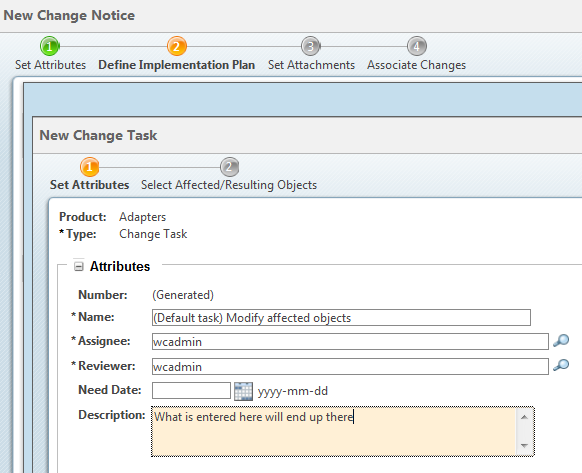
I'm trying to set the default description on a change task/change activity to be some static text. I can set a default value in the type and attribute manager, and that works... Unless the user enters any text into the change notice description first.

So I guess what I'm really trying to do is to STOP the description from the change notice being used to overwrite the change task description. I'd like whatever default value I determine for the change task to always show up regardless of the value of the notice description.

I've tried looking in the type and attribute manager, in the object initialization rules... I've been tearing through help files, PTC's support site, this forum, and so far I've had no luck. Any help or ideas would be appreciated!!
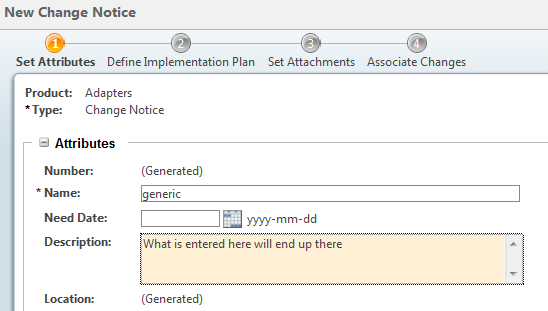
Change Notice Attributes.PNG

change Task Attributes.PNG

6 replies

1-Visitor
March 4, 2016

What about the Start Transition from the Properties function of the change task workflow? You could put a code script in there (sorry my coding skills aren't the greatest so I don't know the exact code) that would set that field to whatever you want the very instant a task was created.

And don't you have a manually-triggered Propagate Information toggle on the Task creation page? You should be able to choose when you want the information to show up, not have it automatically forced.

Daryl

17-Peridot
March 4, 2016

If you are using 10.2 F000 or above you can use a Change Notice Template.  In the Template you can create Change Tasks and give them their own names for the Template.  Its a quick way to easily build an Implementation Plan that starts with common patterns of needed Change Tasks.  You can have multiple templates and different Change Notice types can have their own Templates as well.

afraser-21-VisitorAuthor
1-Visitor
March 4, 2016

Well that sounds nice! Unfortunately I'm on 10.1 M050, (sorry I should have specified that up top).


Thanks for the idea though!

1-Visitor
March 4, 2016

So you're in the same boat as me , well more or less, I'm 10.1 M040.

So did what I suggest above help?