1-Visitor
December 4, 2014
Solved

How to set the state "released" for all all library parts in a single shot ?

  • December 4, 2014
  • 6 replies
  • 2239 views

Have 500 library parts in commonspace .

I want to change the set the state to released condition ?

How to set for all parts in a single shot ?

Best answer by JeffZemsky

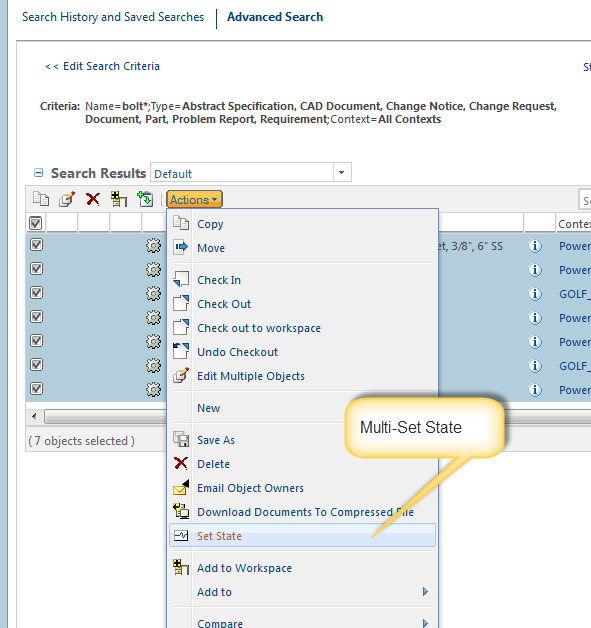
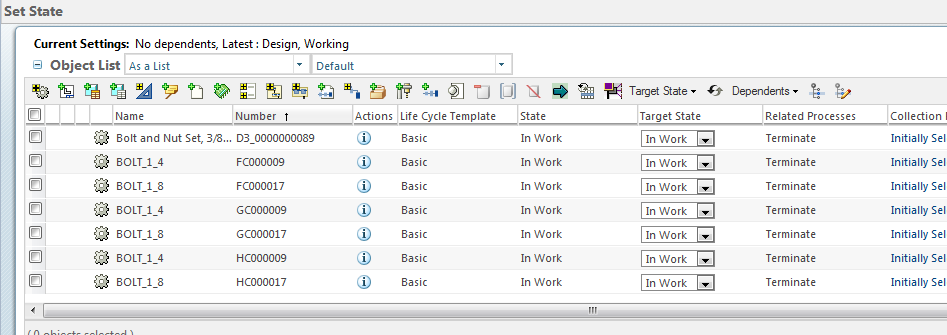
Sorry Tom - mixing my MORs - its in the next release 10.2 M030 for the Serach results.

search.png

mss.png

6 replies

23-Emerald IV
December 4, 2014

Two options. Add all to a workspace, then "set state" or simply go to the folder (or do a search for everything in the context) and then "Actions, Process, Reassign Life Cycles".

17-Peridot
December 4, 2014

If you are using 10.1 M040 or above we support Set State for multiple Objects from Folders (and from Search Results in 10.2 M020). You can just select all the items in the Folder and select Set State from the Actions drop down in the Folder.

23-Emerald IV
December 4, 2014

Jeffrey L. Zemsky wrote:

If you are using 10.1 M040 or above we support Set State for multiple Objects from Folders (and from Search Results in 10.2 M020). You can just select all the items in the Folder and select Set State from the Actions drop down in the Folder.

Jeff, are you sure about from a search? I'm running 10.2 M020 and there is no option to set state from search results (as site admin).

3.png