14-Alexandrite
August 1, 2023
Solved

how to use configurable module generate a new item with 3D model in windchill web page?

  • August 1, 2023
  • 1 reply
  • 2837 views

Hello, All
Here is my problem:
After I checked in the configurate product 3d model in Creo,
I made some options for the items that I made above in the windchill,
Also in windchill page I used the configurable module to generated a new item with BOM structure,
But this item is not ossociate with any 3D model.
Do you know how to generate a new item with 3D model in windchill web page?
What are the windchill server configuration or license need?

Thanks in advance!

Best answer by HelesicPetr

Hi @Sulibo 


In my opinion If you need to create variants with 3D model you need to start in Creo with Creo Options Modeler license where the variants were generated.

The description how to propagate the option&variant to 3D is here Article CS195637?


very important is to propagate the configuration to 3D


HelesicPetr_1-1690897164505.png


I may be wrong and someone else can correct me. 


PetrH

1 reply

HelesicPetr
22-Sapphire II
22-Sapphire II
August 1, 2023

Hi @Sulibo 

For this configuration the 3D models are not needed . So you need to create it manually.

PetrH

PetrH
Sulibo14-AlexandriteAuthor
14-Alexandrite
August 1, 2023

Hello, PetrH,

do your 'manually' mean : I need use the configuration 3D model to generate the 3D model for the windchill Bom, do I understand right?

but how to use windchill options logic to make sure the 3D model is right for the windchill bom?

HelesicPetr
22-Sapphire II
22-Sapphire II
August 1, 2023

Hi, 

Create new CAD Assembly,


connect the CAD Assembly to generated WTPart

HelesicPetr_0-1690889183176.png

HelesicPetr_1-1690889219574.png

Search for the CAD assembly

HelesicPetr_2-1690889267321.png

HelesicPetr_3-1690889299947.png

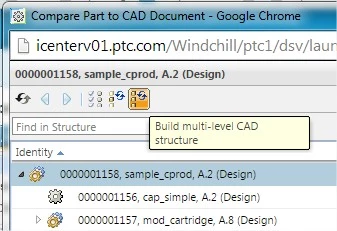
In the structure use Build to CAD

HelesicPetr_4-1690889322537.png


The Publish to CAD will propagate WTPart structure that have associated CAD parts to the new CAD assembly.


PetrH


PetrH