
10-Marble
May 29, 2024
Solved

How to use sub -select?

  • May 29, 2024
  • 4 replies
  • 1431 views

I believe that I need to use sub-select on my report.

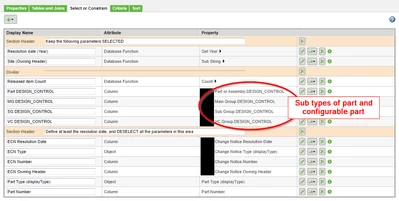
I am creating a report that counts the number of released parts per ECN.
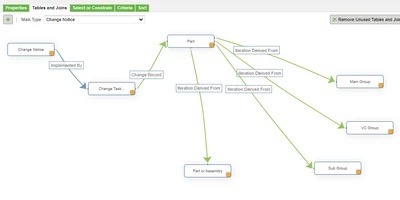
The report needs to list attributes related to subtypes of Parts in my organization.
It causes multiple lines since for each subtype there will be a new column for the attribute...

I understand that If I use sub-select, I can run the query and concatenate the result in a way to have the attribute in a single column.
lnunes_0-1717001181232.png

lnunes_1-1717001301389.png


Best answer by rhart

In this case I think you should use the database function concat, or another way could be to create multiple queries and union them

4 replies

rhart16-PearlAnswer
16-Pearl
May 29, 2024

In this case I think you should use the database function concat, or another way could be to create multiple queries and union them

Community Moderator
June 24, 2024

Hi @lnunes,


I wanted to follow up with you on your post to see if your question has been answered. 
If so, please mark the appropriate reply as the Accepted Solution. 
Of course, if you have more to share on your issue, please let the Community know so that we can continue to help you. 


Thanks,
Anurag
 

joe_morton
18-Opal
18-Opal
July 2, 2024

I think you can use the Database function "concatenate" in this case.

The Part will only have 1 subtype, so if you concatenate the value of all the subtypes together, you'll get something like "null, null, Value, null". The end result will be just the value you care about.


Here's an example where I do something similar:

joe_morton_0-1719948321872.png

joe_morton_1-1719948329123.png