1-Visitor
August 11, 2025
Solved

I am using Windchill PDMLink Release 11.0 and Datecode with CPS M030-CPS22 unable update.

  • August 11, 2025
  • 2 replies
  • 464 views
I am using Windchill PDMLink Release 11.0 and Datecode with CPS M030-CPS22

使用CPS進行更新,狀態為反灰,無法進行,請聯繫rita.lin@ttpsc.com
    Best answer by HelesicPetr

    Hi @明巫_4156481 

    The case is usually a different installation user then you try to update the system. 

    The user profile contains very important xml file that points to the Windchill installation


    If the user profile files are missing then the update option is grey out. 
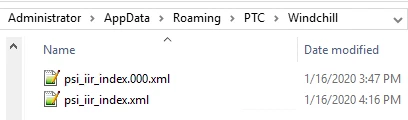
    HelesicPetr_0-1754896176827.png

    Content of the file

    <?xml version="1.0" encoding="UTF-8"?>
    <!DOCTYPE InstallInstances [
     <!ELEMENT InstallInstances (Instance*)>
     <!ELEMENT Instance EMPTY>
     <!ATTLIST Instance id CDATA #REQUIRED>
     <!ATTLIST Instance location CDATA #REQUIRED>
    ]>
    
    <InstallInstances>
     <!--Registries are located in '[location]\installer\instreg\[id]'-->
     <Instance location="C:\Windchill_11.0\PSI" id="ii-26f8ca2f.16faeed5930.-8000"/>
    </InstallInstances>
    

    if the file is missing you can recreate it by yourself. Just point the correct location to a PSI . 

    PS> you can find the ID in the PSI folder in a PTCSolnInstaller-installer.properties file. 

    WC_PROMPTED.PSI.SELECTED_UPDATE_INSTANCE=ii-26f8ca2f.16faeed5930.-8000

    PetrH

    2 replies

    HelesicPetr
    22-Sapphire II
    22-Sapphire II
    August 11, 2025

    Hi @明巫_4156481 

    The case is usually a different installation user then you try to update the system. 

    The user profile contains very important xml file that points to the Windchill installation


    If the user profile files are missing then the update option is grey out. 

    HelesicPetr_0-1754896176827.png

    Content of the file

    <?xml version="1.0" encoding="UTF-8"?>
    <!DOCTYPE InstallInstances [
     <!ELEMENT InstallInstances (Instance*)>
     <!ELEMENT Instance EMPTY>
     <!ATTLIST Instance id CDATA #REQUIRED>
     <!ATTLIST Instance location CDATA #REQUIRED>
    ]>
    
    <InstallInstances>
     <!--Registries are located in '[location]\installer\instreg\[id]'-->
     <Instance location="C:\Windchill_11.0\PSI" id="ii-26f8ca2f.16faeed5930.-8000"/>
    </InstallInstances>
    

    if the file is missing you can recreate it by yourself. Just point the correct location to a PSI . 

    PS> you can find the ID in the PSI folder in a PTCSolnInstaller-installer.properties file. 

    WC_PROMPTED.PSI.SELECTED_UPDATE_INSTANCE=ii-26f8ca2f.16faeed5930.-8000

    PetrH

    Community Moderator
    August 18, 2025

    Hello @明巫_4156481


    It looks like you have a response from a community champion. If it helped you solve your question please mark the reply as the Accepted Solution. 
    Of course, if you have more to share on your issue, please let the Community know so other community members can continue to help you.

    Thanks,
    Vivek N.
    Community Moderation Team.
