10-Marble
March 6, 2025
Solved

Impossible to access Windchill Server

  • March 6, 2025
  • 3 replies
  • 2366 views

Version: Windchill 12.1


Use Case: Windchill Server Access


Description:

Hello everyone.

I have a problem with Windchill.

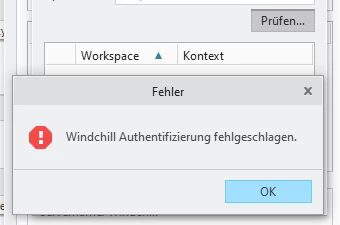
Basically I can access the Homepage without any problems (after inserting my credentials) but the server status is always shown as offline and if I try to chech the server status I got a message stating that there is a problem with Windows authentication.
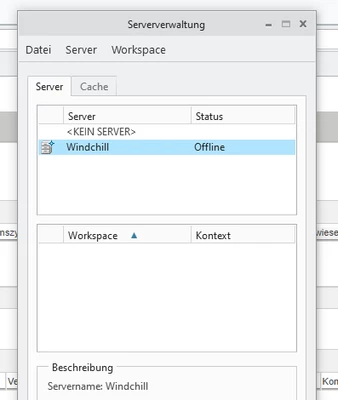
GF_12989597_0-1741248403833.png

Server status: Offline


GF_12989597_1-1741248515921.png

Windows authentication problem when trying to chech server status
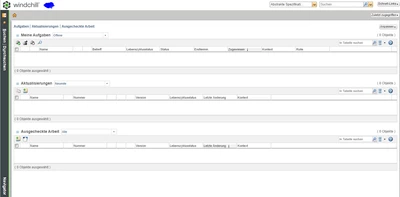
 

GF_12989597_2-1741248549585.png

Homepage correctly visualized, so the connection is there.


Any ideas would be deeply appreciated.

Many thanks

Cheers.

Best answer by GF_12989597

Hi everyone.

I have managed to solve this issue. Hope will help someone in the future.

All I had to do is rename/move the cache folder in the Creo Installation directory (C:\PTC\WINDCHILL\***USERNAME***\creo9\Cache.
This will force the program to write a new folder, and this will allow the connection with Windchill.

Cheers. 

3 replies

avillanueva
23-Emerald I
23-Emerald I
March 6, 2025

What licenses are assigned to your user account? There can be a number of reasons. Corrupt workspace? https://www.ptc.com/en/support/article/CS376314?source=search

Give us some background. Was it working before? Was there a change? Are other users seeing same issue? Looks like you were able to make a connection once before but it is remaining offline correct?

10-Marble
March 6, 2025

Hi and thanks for your answer.

Well, actually, I didnt know much of the background as this is a new user which has been recently created for me at my workplace so I guess I cant say if it was working before or not as it didnt exist at all.

No other users with the same issue, I am the only one here using Creo so there´s no chance for a comparison.

The connection is there meaning that, after giving username and password, I can access the homepage correctly, I can see the library etc.

GF_12989597_0-1741263991443.png


The only thing which is missing is that I cant access workspace or commonspace.

Trying to open a common space results in a blank page, trying to open a workspace results in an error.

And, as I have said, if I try to check the server connections, it shows as offline.

avillanueva
23-Emerald I
23-Emerald I
March 6, 2025

Have your admin check your licenses assigned to this account. You must have this license, "PTC Creo Data Management and Visualization" assigned or you will not be able to access Windchill via Creo and create a workspace. 

joe_morton
18-Opal
18-Opal
March 6, 2025

What version of Creo are you using?

10-Marble
March 7, 2025

9.0.4.0

GF_1298959710-MarbleAuthorAnswer
10-Marble
March 12, 2025

Hi everyone.

I have managed to solve this issue. Hope will help someone in the future.

All I had to do is rename/move the cache folder in the Creo Installation directory (C:\PTC\WINDCHILL\***USERNAME***\creo9\Cache.
This will force the program to write a new folder, and this will allow the connection with Windchill.

Cheers. 

avillanueva
23-Emerald I
23-Emerald I
March 12, 2025