14-Alexandrite
February 17, 2025
Question

Internal display names on Workflow Tasks

  • February 17, 2025
  • 2 replies
  • 549 views

Version: Windchill 12.1

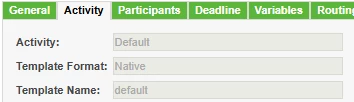
I am using:

LG_10096154_1-1739825757133.png


How do I change to Activity to not show these internal names when using Chrome. With my Amin account in Edge the tasks display correctly. 
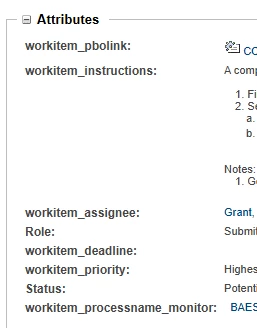
LG_10096154_0-1739825712182.png


2 replies

avillanueva
23-Emerald I
23-Emerald I
February 18, 2025

Clearing browser cache in each results in what?

14-Alexandrite
February 18, 2025

Nothing, But if I switch to Edge with my normal user account it looks correct. It seems that Chrome may be causing issues again.

HelesicPetr
22-Sapphire II
22-Sapphire II
February 19, 2025

Hi @LG_10096154 

Interesting thing is that the Edge is a chrome cored application so there should not be a difference.

Or you use internet explorer configuration and it can be the case.

btw there is no reason why one browser shows the display names and an another internal names.

I would delete all caches of the browser as @avillanueva has mentioned. All history from the beginning of being 😄

PetrH

joe_morton
18-Opal
18-Opal
February 24, 2025

Dumb question, but could it be a region thing..? I think the display names can be region-specific. So theoretically your admin account may be using a region that you configured, and a different account might be using a region that you didn't. 

HelesicPetr
22-Sapphire II
22-Sapphire II
February 25, 2025

Hi @joe_morton 

You could be right. If the region is not set then it can behave a weird way

PetrH