
1-Visitor
February 1, 2018
Question

Intralink 3.3 - restore an old dump file

  • February 1, 2018
  • 4 replies
  • 2841 views

Hi All,


i need to restore an old export. When i import the dump file, i become the following message: 
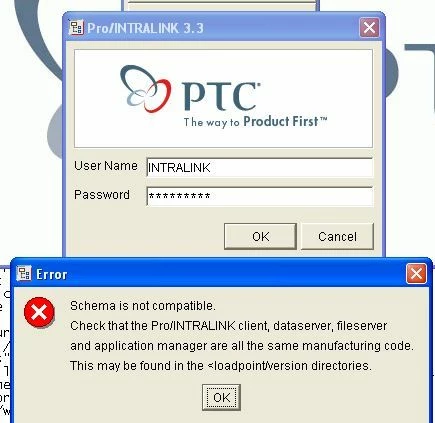
intralink.jpg

I dont know nothing about this dump file - only that it contains old important parts 🙂


I have 3.3 and 3.3 SP installed. Before import dump file, intralink is working ( i can login to intralink)

Import log good, without error.


What can i do?

Thanks!

4 replies

20-Turquoise
February 1, 2018

After importing the dump file you will most likely need to run the ilink_patches.sh:

https://support.ptc.com/appserver/cs/view/solution.jsp?n=31541


A complete restore of an Intralink system would also include a restore of the file vaults. Depending on what it is you are after you may also have to restore the file vaults.

martonb1-VisitorAuthor
1-Visitor
February 2, 2018

Dear Randy,


thanks for your answer. I has make the settings, but same. Do you have any ideas? I never use intralink before.

Many thanks!


please see attachments (log files) and

my CMD window

:\Documents and Settings\Rendszergazda>set PROI_SYS_PWD=dschangeme

C:\Documents and Settings\Rendszergazda>set ORA_SYS_PWD=manager

C:\Documents and Settings\Rendszergazda>set FS_SYS_PWD=fschangeme

C:\Documents and Settings\Rendszergazda>cd c:\ptc\dataserver\intralink\dbs\ilink
_patches\tools

C:\ptc\dataserver\intralink\dbs\ilink_patches\tools>ilink_patches all ilnk INTRA
LINK


 DO NOT REMOVE THIS WINDOW!!!

###########################################################
 Pro/INTRALINK Data Server update

 Started: 02/02/18 07:59:30

Update parameters:

 Update type = "ALL"
 ORACLE_SID = ilnk
 Language = ENGLISH
 SQL*Net service name = INTRALINK

###########################################################


Getting version of dataserver loadpoint ... OK
Restarting database ... OK
Preparing to update ORACLE data dictionary ... Ok
Updating ORACLE data dictionary (10-20 minutes) ... OK
Creating users and their privileges ... OK
Compiling all invalid database objects ... OK
Removing invalid jobs if they exist ... OK
Preparing of PDM schema for update ... OK
 Database character set: UTF8
Checking that schema is consistent ... OK
Stopping Oracle jobs ... OK
 Current language: ENGLISH
 New language: ENGLISH
 NLS_LANG set to: "AMERICAN_AMERICA.WE8ISO8859P1"
Update sequence PDM_REVISIONS_SEQ ... OK

Getting current version of schema ... OK

UPGRADE INFO:

 Current version = "I5.0.0.208.6"
 Source version = "I5.0.0.208.6"

Checking possibility of upgrade ... No patch installation is required.

Giving privileges to PDM_PWD and PDM_REPL_SVC ... OK
Restoring synonyms for PDM_PWD ... OK
Restoring synonyms for PDM_REPL_SVC ... OK
Restoring synonyms for PDM_SNAPSHOT_USER ... OK
Changing Dataserver Language to ENGLISH ... OK
Starting Oracle jobs "PDMSP_CLEANUPTXN_PKG.CLEANUP"... OK

HEALING SCRIPTS:

 Running script .\ilink_patches\hl_scripts\hl_H0343.sql ... OK
 Running script .\ilink_patches\hl_scripts\hl_day1.sql ... OK
 - report in file .\ilink_patches\log\hl_day1.lst
 Running script .\ilink_patches\hl_scripts\hl_sequences.sql ... OK
 - report in file .\ilink_patches\log\hl_sequences.lst
 Running script .\ilink_patches\hl_scripts\hl_pivclass.sql ... OK
 - report in file .\ilink_patches\log\hl_pivclass.lst
 Running script .\ilink_patches\hl_scripts\hl_populateudas.sql ... OK
 - report in file .\ilink_patches\log\hl_populateudas.lst
 Running script .\ilink_patches\hl_scripts\hl_views.sql ... OK
 - report in file .\ilink_patches\log\hl_views.lst
 Running script .\ilink_patches\hl_scripts\hl_checkOQLs.sql ... OK
 - report in file .\ilink_patches\log\hl_checkOQLs.lst
 Running script .\ilink_patches\hl_scripts\hl_updreplreg.sql ... OK
 - report in file .\ilink_patches\log\hl_updreplreg.lst
 Running script .\ilink_patches\hl_scripts\hl_unique_pivbrver.sql ... OK
 - report in file .\ilink_patches\log\hl_unique_pivbrver.lst
 Running script .\ilink_patches\hl_scripts\hl_del_unused_pivtxns.sql ... OK
 - report in file .\ilink_patches\log\hl_del_unused_pivtxns.lst
 Running script .\ilink_patches\hl_scripts\hl_report_broken_mapname.sql ... OK

 - report in file .\ilink_patches\log\hl_report_broken_mapname.lst

Setting local domain ... OK
Single side environment installed.
Proceeding without running initgroup
and creating synonyms.
Performing post update actions for PDM schema ... OK
 Data integrity validation ... WARNING


 Update script finished: 02/02/18 08:01:03

Data Server update finished with warnings.

Warnings have been written to C:\ptc\dataserver\intralink\dbs\warning.txt
Log has been written to C:\ptc\dataserver\intralink\dbs\ilink_patches\log\I5.0.0
.208.6.log


20-Turquoise
February 2, 2018

From the output of the ilink_patches it appears the dump file was already the same version as the installed server:

UPGRADE INFO:

 Current version = "I5.0.0.208.6"
 Source version = "I5.0.0.208.6"

Checking possibility of upgrade ... No patch installation is required.

 You will also get the "Schema is not compatible..." message if the client and the server are not exactly the same version. So like the "Schema is not compatible..." says look in the <loadpoint>/versions directories for the versions.  I just took a look at a 3.4 M062 client loadpoint (that I disovered still exists...) and found that <loadpoint>/uninstall/instlog.txt contains the client version.


I also took a look in our online backup and discovered we still have a backup of the dataserver. The dataserver version for 3.4 M062 is kept in <loadpoint>/intralink/uninstall/instlog.txt.


So the versions from those 2 files need to be the same.