10-Marble
December 28, 2016
Solved

intralink3.4 versus PDM Essentials

  • December 28, 2016
  • 1 reply
  • 1954 views

sorry for my bad English
In the transition between INTRALINK 3.4 and pdm essentials I find difficulty.
It lacks the duplicate file function in the workspace.
How do I reactivate it?

Save as is not the same operation , It does not maintain ties with the assembly

TY
Best answer by JenniferPierron

Hello.

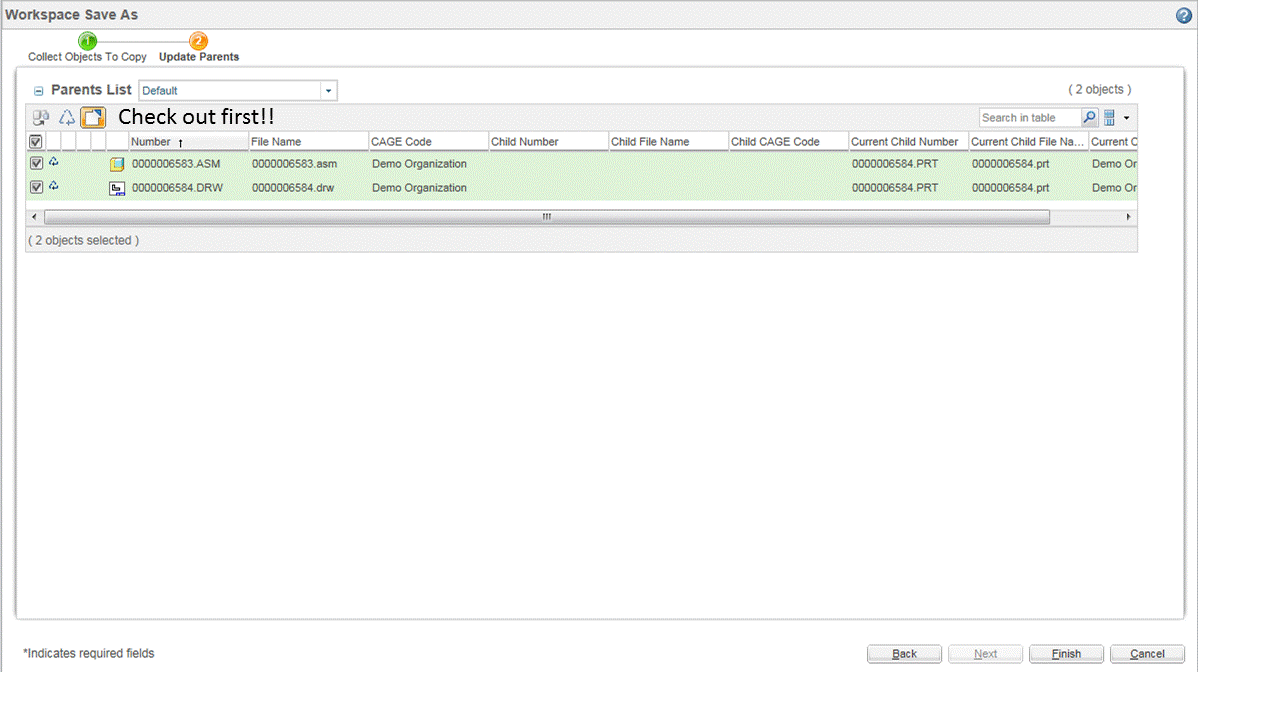
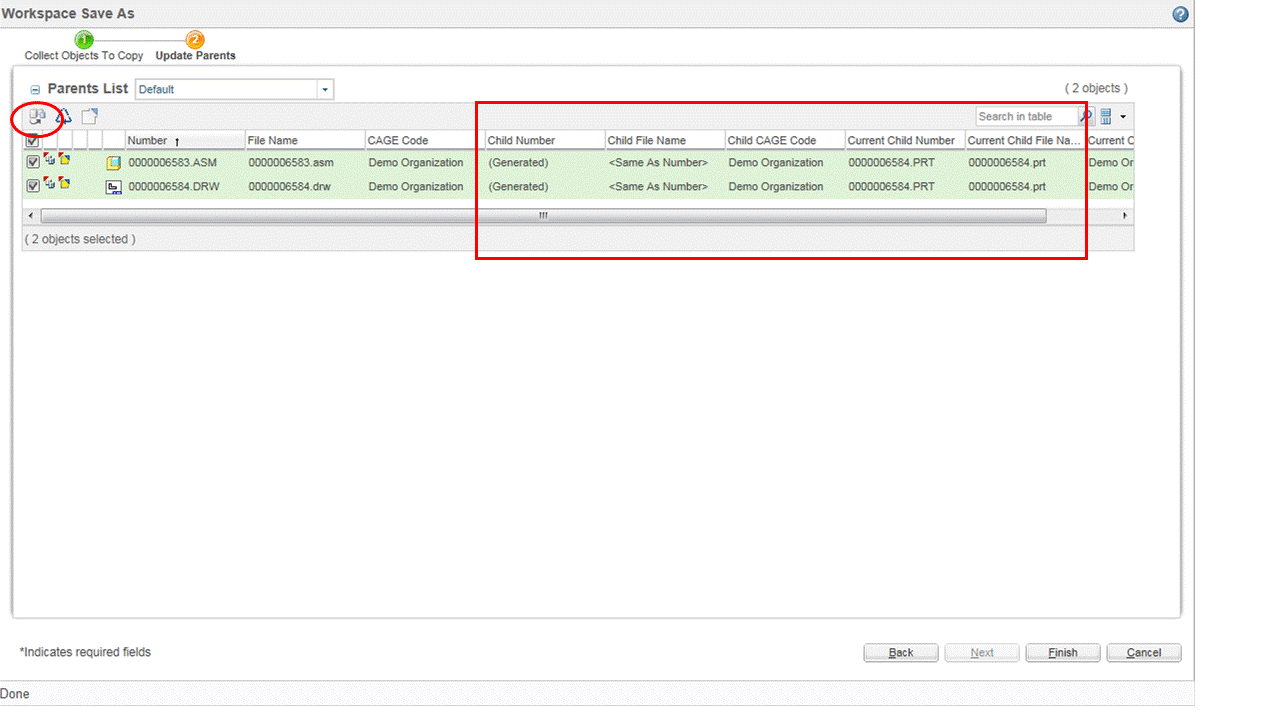
In Workspace Save As, you can use the 2nd step on the wizard called "Update Parents" to modify the assembly (and other parents in the workspace like the drawing) to use the new copy.

Things to keep in mind when switching from Pro/INTRALINK 3.x to Windchill:

- Modifications can only be made on objects that are checked out, so if the assembly is not already checked out, you will need to use the check out icon before you can set it to use the new copy.

Slide1.GIF

Slide2.GIF

Slide3.GIF

I hope this helps.

Sincerely,

Jennifer

1 reply

14-Alexandrite
January 2, 2017

Hello.

In Workspace Save As, you can use the 2nd step on the wizard called "Update Parents" to modify the assembly (and other parents in the workspace like the drawing) to use the new copy.

Things to keep in mind when switching from Pro/INTRALINK 3.x to Windchill:

- Modifications can only be made on objects that are checked out, so if the assembly is not already checked out, you will need to use the check out icon before you can set it to use the new copy.

Slide1.GIF

Slide2.GIF

Slide3.GIF

I hope this helps.

Sincerely,

Jennifer

mamobono10-MarbleAuthor
10-Marble
January 9, 2017

Jennifer thanks for the reply
I have another question
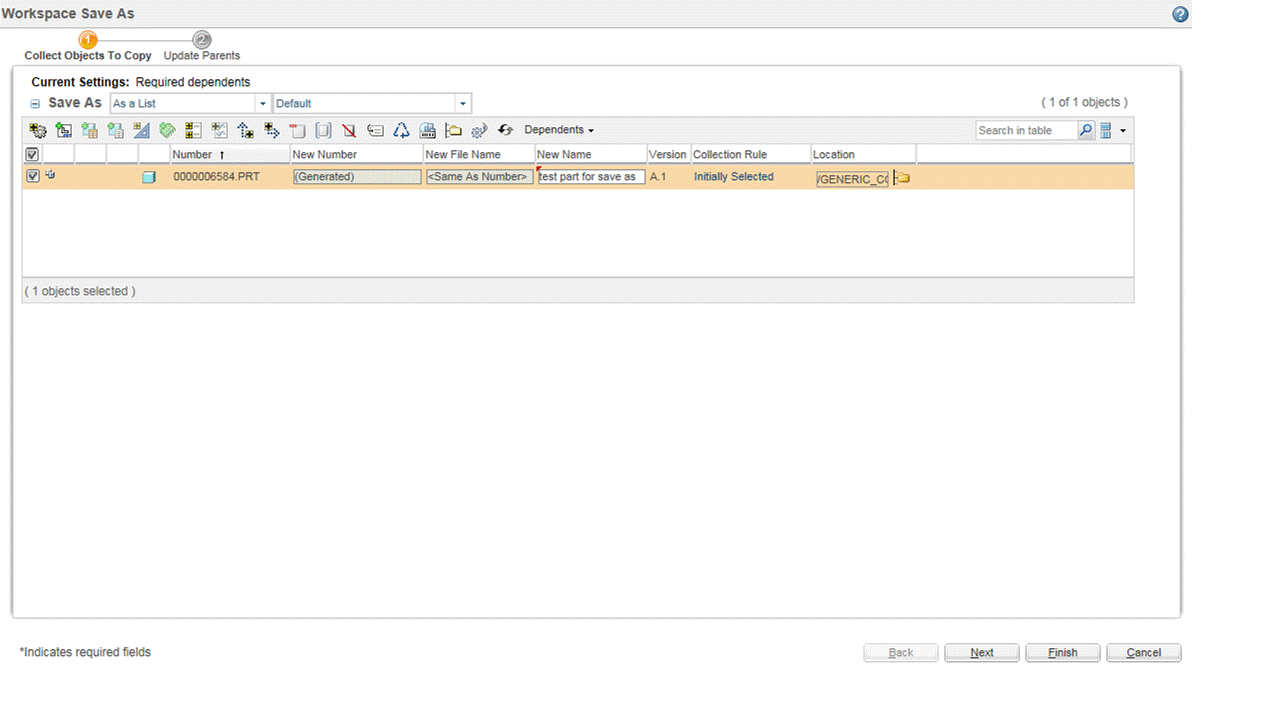
You can only put the new file name and have automatically:
the new number field and the new name field empty, or automatically, with the same name of the new file (see image )
There is a setting for this?

Now I have to enter the new name 6 times


TYname.jpg

14-Alexandrite
January 9, 2017

Hello.

Yes.  You can set up an Object Initialization Rule for CAD Documents to generate the Number and Name from File Name.

(see help center chapter Specialized Administration > Tailoring Business Objects > Understanding Object Initialization Rules)

You can add rules to set CAD Doc's number=CADName and name=CADName.

The result will be in New CAD Document, Rename, Save As and when you upload and check in, all three values will be the same by default:

Here is an example the .xml file used to create this OIR:

            <AttributeValues objType="wt.epm.EPMDocument">

               <!-- set the folder -->
               <AttrValue id="folder.id" algorithm="com.ptc.core.foundation.folder.server.impl.FolderPathAttributeAlgorithm">
                  <Arg>/Default</Arg>
               </AttrValue>

               <!--  set the number to a File Name   -->
        <AttrValue id="number" algorithm="com.ptc.windchill.enterprise.revisionControlled.server.impl.NumberGenerator">
        <Attr id="CADName"/>
               </AttrValue>

               <!--  set the name to File Name   -->
        <AttrValue id="name" algorithm="com.ptc.windchill.enterprise.revisionControlled.server.impl.NumberGenerator">
        <Attr id="CADName"/>
               </AttrValue>

               <!-- set the lifecycle -->
               <AttrValue id="lifeCycle.id" algorithm="com.ptc.core.foundation.lifecycle.server.impl.LifeCycleTemplateAttributeAlgorithm">
                  <Arg>
                     <!-- Translation of the word "Basic" must be the same as the translation done in commonLifeCycles.xml -->
                     <?loc-begin key="BASIC_LIFECYCLE_NAME" maxlen="30" match="commonLifeCycles.xml:BASIC_LIFECYCLE_NAME"?>Basic<?loc-end?>
                  </Arg>
               </AttrValue>

               <!-- set the team template -->
               <AttrValue id="teamTemplate.id" algorithm="com.ptc.core.foundation.team.server.impl.TeamTemplateAttributeAlgorithm">
                  <Arg>Default</Arg>
               </AttrValue>

               <!-- set the version info to a generated version info -->
               <AttrValue id="MBA|versionInfo" algorithm="com.ptc.core.foundation.vc.server.impl.VersionInfoGenerator">
                  <Arg>wt.series.HarvardSeries</Arg>
               </AttrValue>
              
               <!-- specify AttrConstraint tag -->
               <AttrConstraint id="lifeCycle.id" algorithm="com.ptc.core.rule.server.impl.GatherAttributeConstraints">           
            <Value algorithm="com.ptc.core.rule.server.impl.GetServerAssignedConstraint"/>
            <Value algorithm="com.ptc.core.rule.server.impl.GetImmutableConstraint"/>
        </AttrConstraint>
        <AttrConstraint id="lifeCycle" algorithm="com.ptc.core.rule.server.impl.GatherAttributeConstraints">
            <Value algorithm="com.ptc.core.rule.server.impl.GetServerAssignedConstraint"/>     
            <Value algorithm="com.ptc.core.rule.server.impl.GetImmutableConstraint"/>
        </AttrConstraint>
        <AttrConstraint id="folder.id" algorithm="com.ptc.core.rule.server.impl.GatherAttributeConstraints">
             <Value algorithm="com.ptc.core.rule.server.impl.GetServerPreGeneratedValue"/>      
        </AttrConstraint>
       
        <AttrConstraint id="teamTemplate.id" algorithm="com.ptc.core.rule.server.impl.GatherAttributeConstraints">           
             <Value algorithm="com.ptc.core.rule.server.impl.GetServerAssignedConstraint"/>                        
             <Value algorithm="com.ptc.core.rule.server.impl.GetImmutableConstraint"/>
        </AttrConstraint>
        <AttrConstraint id="teamTemplate" algorithm="com.ptc.core.rule.server.impl.GatherAttributeConstraints">
             <Value algorithm="com.ptc.core.rule.server.impl.GetServerAssignedConstraint"/>     
             <Value algorithm="com.ptc.core.rule.server.impl.GetImmutableConstraint"/>
        </AttrConstraint> 
        <AttrConstraint id="organization.id" algorithm="com.ptc.core.rule.server.impl.GatherAttributeConstraints">
             <Value algorithm="com.ptc.core.rule.server.impl.GetServerPreGeneratedValue">
               <Value algorithm="com.ptc.windchill.enterprise.org.server.impl.OwningOrgDefaultAlgorithm"/>
             </Value>
        </AttrConstraint>

        <AttrConstraint id="number" algorithm="com.ptc.core.rule.server.impl.GatherAttributeConstraints">
             <Value algorithm="com.ptc.core.rule.server.impl.GetServerAssignedConstraint"/>     
        </AttrConstraint>
       
        <AttrConstraint id="name" algorithm="com.ptc.core.rule.server.impl.GatherAttributeConstraints">
             <Value algorithm="com.ptc.core.rule.server.impl.GetServerAssignedConstraint"/>     
        </AttrConstraint>
            </AttributeValues>


(note: in my OIR the Name and Number are still editable; but you can set it so they are not editable.  To make them Immutable add the constraints <Value algorithm="com.ptc.core.rule.server.impl.GetImmutableConstraint"/> for both number and name)

Thanks

Jennifer