1-Visitor
May 14, 2018
Solved

Inventor not registering

  • May 14, 2018
  • 3 replies
  • 3922 views

Greetings,

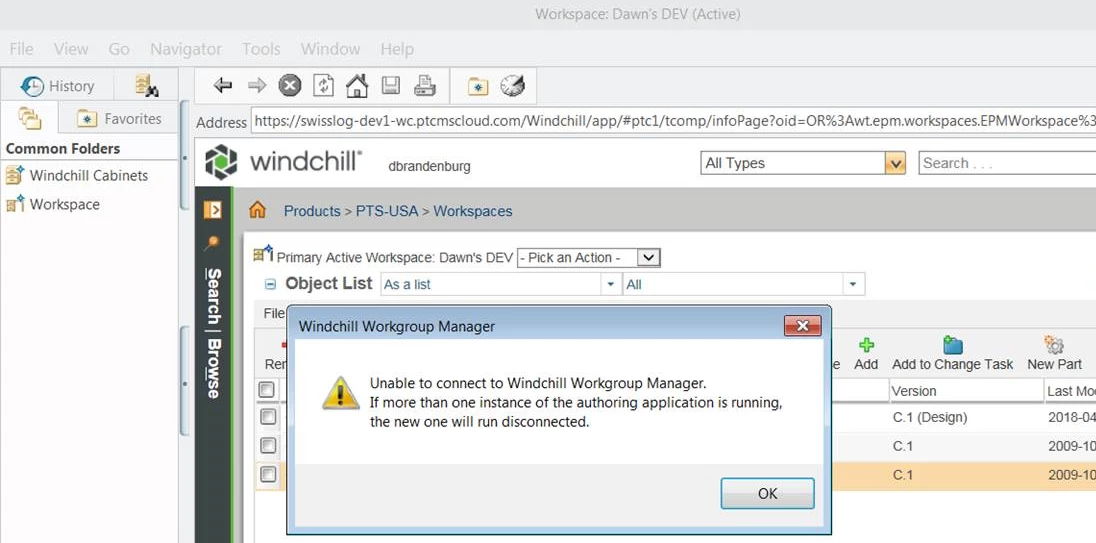
I have an odd little problem.  We are in process of our final testing of our new Windchill 11.0 (M030 CPS08) environment.  One of our users can no longer connect to Windchill using Inventor Pro 2017 on her Windows 7 laptop.   Last week we uninstalled her WGM (11.0 M030) and re-installed it. It seemed to function properly and could 'see' Inventor 2017, but when you attempted to 'register' it, it did not quite function.  If you opened WGM, it would produce the error in the Warning image below.  I'm not certain why a shared folder would be a problem.  If you attempted to open an Inventor file, it would give you the error in Error_Image below, then the error in Error_Image_2 below.

These errors occurred after we had purged all browser caches, the Java cache, and had re-installed WGM for Inventor.  Other computers access Windchill just fine via WGM and Inventor. 


Warning

Error_Image.png


Error_Image_2.png


Best answer by pmooteri

Hi,

The reason for the issue is "A shared folder is selected for Windchill File System". Change the Windchill Folder Location in the Windchill Workgroup Manager via Tools > Windchill File System Management to a local unshared folder.


Please refer PTC Article CS167483 for resolution and more information. (https://www.ptc.com/en/support/article?n=CS167483)


Regards,

Pankaj Mooteri

Product Manager, PTC

3 replies

JHall1-VisitorAuthor
1-Visitor
May 14, 2018

The strange thing is, this installation functioned previously when pointed to a different test environment of Windchill.  I also wanted to show this weird error it throws. I've never heard of AdapterA121.

A121.png

pmooteri14-AlexandriteAnswer
14-Alexandrite
May 16, 2018

Hi,

The reason for the issue is "A shared folder is selected for Windchill File System". Change the Windchill Folder Location in the Windchill Workgroup Manager via Tools > Windchill File System Management to a local unshared folder.


Please refer PTC Article CS167483 for resolution and more information. (https://www.ptc.com/en/support/article?n=CS167483)


Regards,

Pankaj Mooteri

Product Manager, PTC

JHall1-VisitorAuthor
1-Visitor
May 16, 2018

@pmooteri  Dude! You are the man, that worked great!  It turns out that even though the folders said 'not shared' they were in fact shared with an admin.  Once we removed that sharing, all the errors went away.


Thanks so much.


James Hall - Swisslog