10-Marble
August 10, 2023
Solved

Is it possible to add Change Request Number in the email notification?

  • August 10, 2023
  • 2 replies
  • 2207 views

Objective:  Change Request/Change Notice Number and description attributes in the Workflow Notification Email.
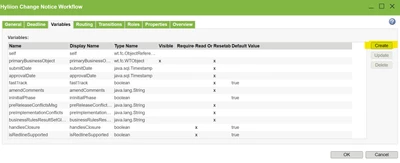
In the workflow template, Is there a way to add Change Request Description/Number as variables ?

RG_10753677_3-1691699811397.png


RG_10753677_1-1691699451779.png


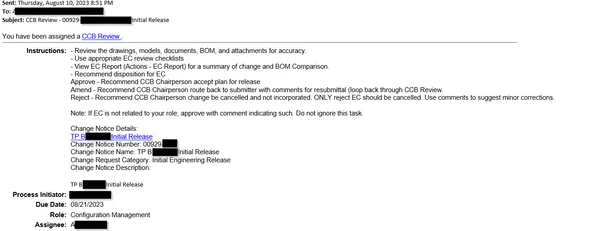
Currently, the email looks like this 
RG_10753677_4-1691699985709.png


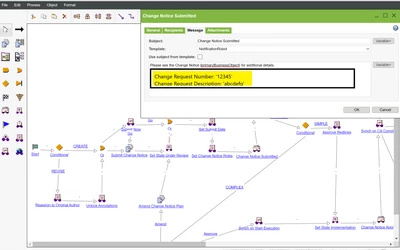
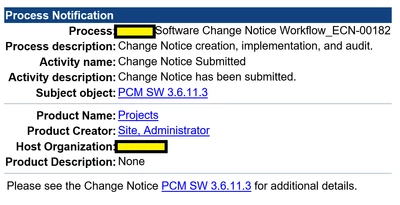
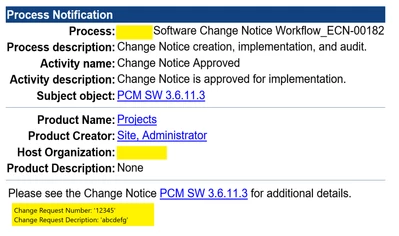
But, I'm looking for something like this with Change Request/Notice attributes in the bottom.

RG_10753677_2-1691699573247.png


Best answer by avillanueva

https://support.ptc.com/help/windchill/r13.0.0.0/en/?_gl=1*1xirda6*_ga*MjA1NjM1MzcyNS4xNjc4OTUwMDM0*_ga_1QBT6P6HR1*MTY5MTQxMTAwMy4zMzAuMS4xNjkxNDEzMDM1LjAuMC4w*_ga_CBN5QVB9VJ*MTY5MTQxMTYwNi4yMTEuMS4xNjkxNDEzMDM1LjAuMC4w#page/Windchill_Help_Center/customization/WCCG_BusLogicCust_WorkflowAdmin_EmailNotif.html

Documentation is above. You need to customize the codebase/templates/General*.html files like below. This is mine to show the PBO name and number. The pboNumber is a workflow variable so you can call those out too. This modifies the email subject as it appears.


<html>
<!-- bcwti
 --
 -- Copyright (c) 1997, 1998 Windchill Technology, Inc. All Rights Reserved.
 --
 -- This software is the confidential and proprietary information of
 -- Windchill Technology. You shall not disclose such confidential information
 -- and shall use it only in accordance with the terms of the license
 -- agreement you entered into with Windchill Technology.
 --
 -- ecwti
 -->
<SCRIPT LANGUAGE=Windchill> <!-- beginSubject --> </SCRIPT>
<SCRIPT LANGUAGE=Windchill> <!-- getActivityName --> </SCRIPT>
<SCRIPT LANGUAGE=Windchill> <!-- addText text=" - " --> </SCRIPT>
<SCRIPT LANGUAGE=Windchill> <!-- getProcessVariable varName="pboNumber" --> </SCRIPT>
<SCRIPT LANGUAGE=Windchill> <!-- addText text=" - " --> </SCRIPT>
<SCRIPT LANGUAGE=Windchill> <!-- getPrimaryBusinessObjectName --> </SCRIPT>
<SCRIPT LANGUAGE=Windchill> <!-- endSubject --> </SCRIPT> 
<head>
 <SCRIPT LANGUAGE=Windchill>
 <!--
 getStyleSheetProps
 -->
 </SCRIPT>
</head>

<body>

<font face="Arial, Helvetica, sans-serif">
<SCRIPT LANGUAGE=Windchill> activityNotificationUrl </SCRIPT>
</font>

<SCRIPT LANGUAGE=Windchill>
<!--
 activityAttributes notification=true
-->
</SCRIPT>

</body>
</html>

Next I modified the task Instructions to include data which would appear in the subject of the email:

avillanueva_0-1691753614752.png

The final result is like this:

avillanueva_1-1691753725435.png


2 replies

avillanueva
23-Emerald I
August 11, 2023
Yes, I’ve done this. I can post instructions.

Sent from my iPhone
avillanueva
23-Emerald I
August 11, 2023

https://support.ptc.com/help/windchill/r13.0.0.0/en/?_gl=1*1xirda6*_ga*MjA1NjM1MzcyNS4xNjc4OTUwMDM0*_ga_1QBT6P6HR1*MTY5MTQxMTAwMy4zMzAuMS4xNjkxNDEzMDM1LjAuMC4w*_ga_CBN5QVB9VJ*MTY5MTQxMTYwNi4yMTEuMS4xNjkxNDEzMDM1LjAuMC4w#page/Windchill_Help_Center/customization/WCCG_BusLogicCust_WorkflowAdmin_EmailNotif.html

Documentation is above. You need to customize the codebase/templates/General*.html files like below. This is mine to show the PBO name and number. The pboNumber is a workflow variable so you can call those out too. This modifies the email subject as it appears.


<html>
<!-- bcwti
 --
 -- Copyright (c) 1997, 1998 Windchill Technology, Inc. All Rights Reserved.
 --
 -- This software is the confidential and proprietary information of
 -- Windchill Technology. You shall not disclose such confidential information
 -- and shall use it only in accordance with the terms of the license
 -- agreement you entered into with Windchill Technology.
 --
 -- ecwti
 -->
<SCRIPT LANGUAGE=Windchill> <!-- beginSubject --> </SCRIPT>
<SCRIPT LANGUAGE=Windchill> <!-- getActivityName --> </SCRIPT>
<SCRIPT LANGUAGE=Windchill> <!-- addText text=" - " --> </SCRIPT>
<SCRIPT LANGUAGE=Windchill> <!-- getProcessVariable varName="pboNumber" --> </SCRIPT>
<SCRIPT LANGUAGE=Windchill> <!-- addText text=" - " --> </SCRIPT>
<SCRIPT LANGUAGE=Windchill> <!-- getPrimaryBusinessObjectName --> </SCRIPT>
<SCRIPT LANGUAGE=Windchill> <!-- endSubject --> </SCRIPT> 
<head>
 <SCRIPT LANGUAGE=Windchill>
 <!--
 getStyleSheetProps
 -->
 </SCRIPT>
</head>

<body>

<font face="Arial, Helvetica, sans-serif">
<SCRIPT LANGUAGE=Windchill> activityNotificationUrl </SCRIPT>
</font>

<SCRIPT LANGUAGE=Windchill>
<!--
 activityAttributes notification=true
-->
</SCRIPT>

</body>
</html>

Next I modified the task Instructions to include data which would appear in the subject of the email:

avillanueva_0-1691753614752.png

The final result is like this:

avillanueva_1-1691753725435.png


10-Marble
August 16, 2023

I've updated General, General_en_GN, General_en_US html files.


RG_10753677_0-1692210767568.png


But since the template in my workflow is NotificationRobot template, I am wondering if I should change the NotificationRobot html files instead of General.* html files.

RG_10753677_1-1692210767579.png


Next, Does the variable need to show up in the dropdown for it to work?


RG_10753677_2-1692210767513.png


This is the output so far. My email notification has {pboNumber} and {pboDescription} variable names instead of their values. Please let me know if I'm missing something.

RG_10753677_3-1692210767566.png


HelesicPetr
22-Sapphire II
August 17, 2023

Hi @RG_10753677 

Sure you need to update the correct html template. So if you use notification robot you need to update that one. 


If the variables do not exist then it will not be shown in the email. 

You need to create the variables in the workflow and fill up with correct values by code.


PetrH